Spreadsheet dependency evaluation
ID: spreadsheet-dependency-evaluation

Evaluate numeric formula dependencies using depth-first search and memoization, or a topological ordering. Marking active evaluations detects cycles; repeated numerical sweeps need not terminate or determine a unique result.
A spreadsheet dependency graph turns a page of spreadsheet formulas into a plan: compute each prerequisite before the spreadsheet cell that consumes it. This section uses a deliberately small model with explicit cell references, fixed spreadsheet formulas, and deterministic computation from numerical inputs. There are no external data changes or formulas that change their references while running. Within these assumptions, a topological order gives a reproducible answer without repeatedly sweeping the visible grid.
Take two input spreadsheet cells and five spreadsheet formulas:
| Spreadsheet cell | Stored input or spreadsheet formula | Initial value | Value after changing A1 to 5 |
|---|---|---|---|
A1 | 3, later 5 | ||
A2 | 4 | ||
B1 | =A1+A2 | ||
B2 | =2*A1 | ||
C1 | =B1+B2 | ||
D1 | =C1/2 | ||
E1 | =A2^2 |
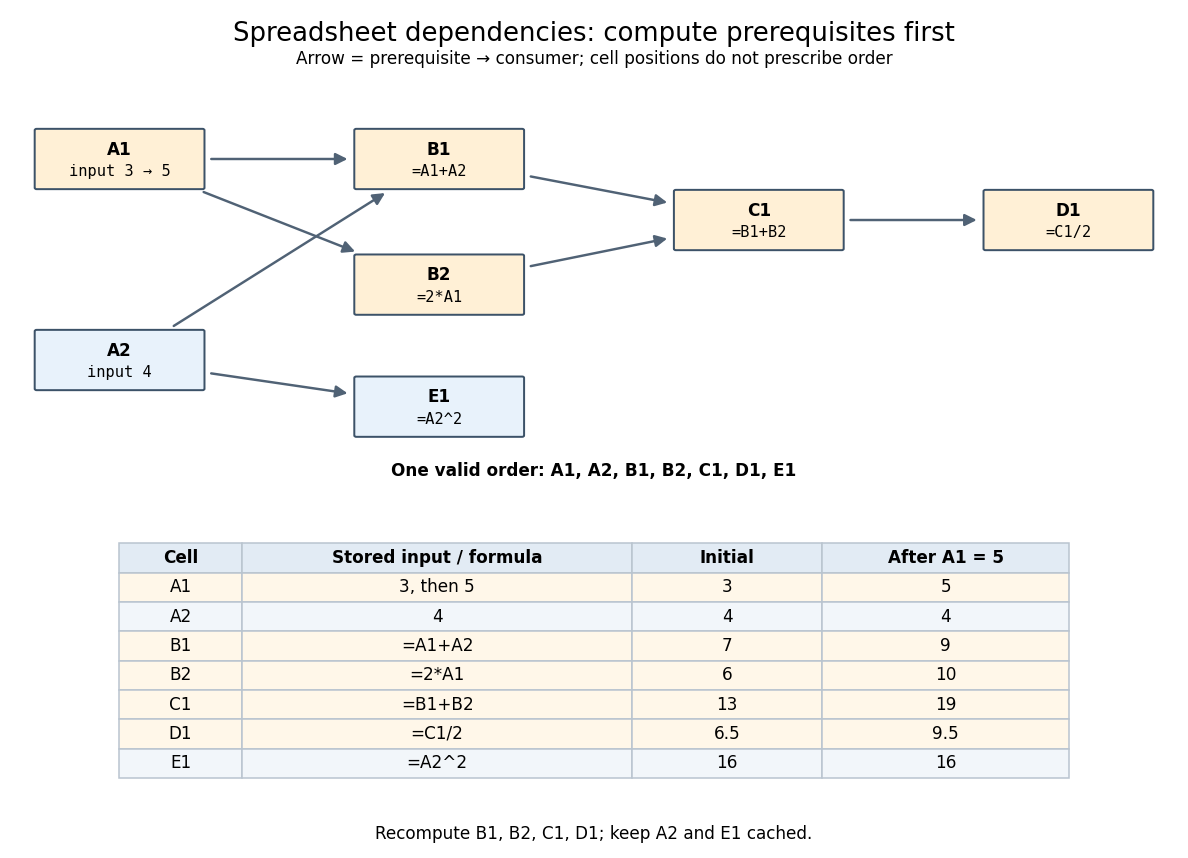
An original spreadsheet dependency graph and a topological order with values before and after one edit
. Details. 
Our directed edge convention is prerequisite to consumer:
A1 B1 means that B1 reads A1, not the reverse. The seven directed edges are A1 B1, A2 B1, A1 B2, B1 C1, B2 C1, C1 D1, and A2 E1. This spreadsheet dependency graph is a Directed acyclic graph. One topological order is A1,A2,B1,B2,C1,D1,E1; E1 could instead be computed immediately after A2. A topological order constrains prerequisites, not the physical positions of spreadsheet cells.In that order, the initial arithmetic operations give , , , , and . The spreadsheet formulas define one value per spreadsheet cell: an outline by induction along any topological order shows that every prerequisite already has its uniquely determined value when its consumer is computed. Different permitted orders therefore agree in this model. The useful idea is that information flows through the Directed acyclic graph even when the visible grid does not display that flow.
A concrete implementation history illustrates this separation. Microsoft's documentation distinguishes the per-worksheet calculation chains used in Excel 2002 and earlier from calculation using multiple software threads introduced in Excel 2007 for independent chain sections. This is a documented implementation example, not a definition of spreadsheet dependency evaluation.[ref]
Excel Recalculation by Microsoft. Dependence, Dirty Cells, and Recalculated Cells: paragraphs beginning “In Excel 2002 and earlier versions” and “In Excel 2007”
New to topics? Read the docs here!