A spreadsheet cell reference identifies the spreadsheet cell read by a spreadsheet formula. In A1 notation,
B3 combines a column letter with a row number. For copying, the column and row can each be relative or absolute, independently: a $ immediately before a coordinate fixes that coordinate during the copy. The $ is an addressing marker, not a currency symbol. [ref]Switch between relative, absolute, and mixed references, Microsoft Support. Switch between relative, absolute, and mixed references: opening paragraphs and table of reference changes when copying two cells down and two cells right
Number columns as , , and so on. If a spreadsheet formula moves by columns and rows during copying, a referenced coordinate becomeswhere each is for a relative coordinate and for an absolute coordinate. This is a translation on the unfixed coordinates. For ordinary in-sheet references whose translated addresses exist, repeated copies compose by addition of their displacements: substitute the rule twice to obtain , and likewise for the row. Copying therefore preserves either a fixed coordinate or an offset from the formula's location.
A relative spreadsheet reference, such as
A2, allows both coordinates to change when its spreadsheet formula is copied. From C2, A2 means two columns left, in the same row. Copy =A2*B2 from C2 to C4: the displacement is zero columns and two rows, so it becomes =A4*B4. The row number changes to retain the same positional relationship to the spreadsheet formula.An absolute spreadsheet reference, such as
$F$1, fixes both coordinates when its spreadsheet formula is copied. In the spreadsheet tabular model, every copied total reads the same tax rate. Absolute addressing retains the spreadsheet cell reference, not the value: changing the input in F1 changes the computed totals even though the references remain $F$1.A mixed spreadsheet reference fixes exactly one coordinate.
$A2 fixes column A and lets the row follow the copy; B$1 fixes row 1 and lets the column follow the copy. Put in A2:A4 and in B1:D1. Store =$A2*B$1 in B2, then fill the rectangle B2:D4. The colon denotes the inclusive rectangular range between the named corner spreadsheet cells. Each spreadsheet formula reads its row's factor from column A and its column's factor from row 1, producing a multiplication table.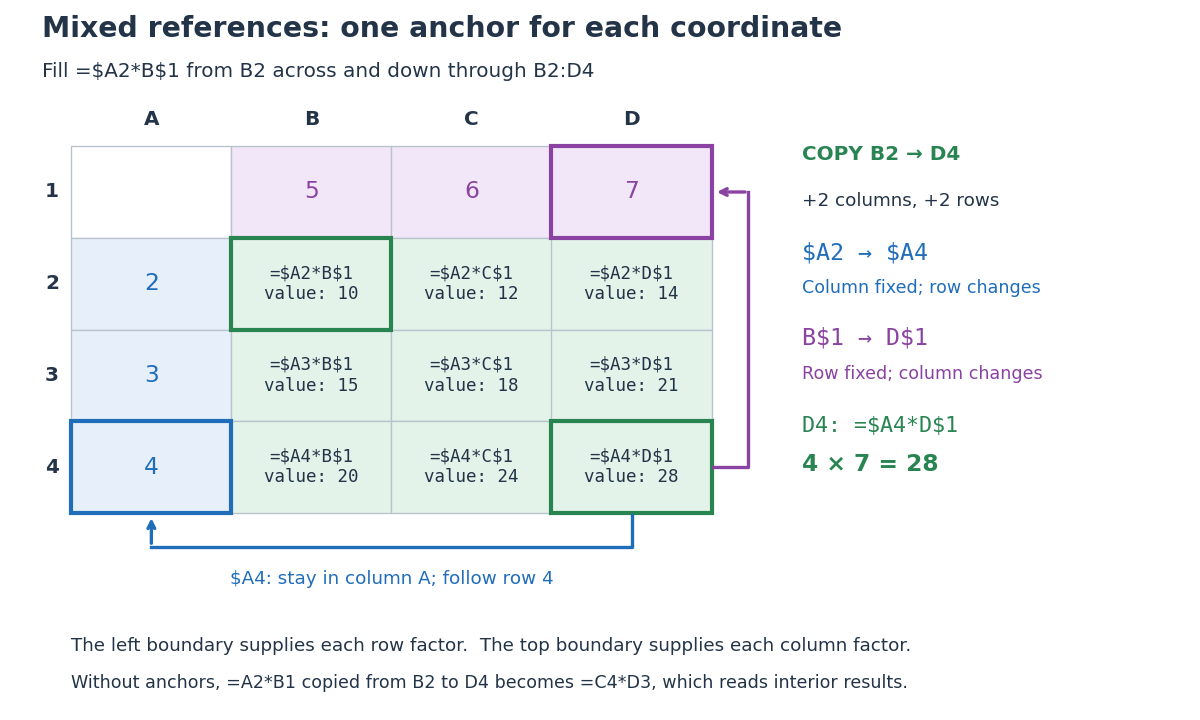
Original multiplication table showing how two mixed spreadsheet references anchor the column and row independently during two-dimensional copying
. Details. 
Copying from
B2 to D4 moves two columns right and two rows down. The mixed spreadsheet references become $A4 and D$1, so D4 contains =$A4*D$1 and has value . For comparison, under that same displacement A2 becomes C4, $A$2 remains $A$2, $A2 becomes $A4, and A$2 becomes C$2. These four cases express the independent choice for each coordinate. Microsoft's official table demonstrates the same four possibilities for a two-row, two-column copy. [ref]Switch between relative, absolute, and mixed references, Microsoft Support. Switch between relative, absolute, and mixed references: final four-row table, absolute column/row, relative column/absolute row, absolute column/relative row, and relative column/row
The filled rows have values , , and . The multiplication table works because the left factor moves only vertically and the top factor moves only horizontally. Without the anchors, copying
=A2*B1 from B2 to D4 would give =C4*D3, reading interior results rather than the intended boundary inputs.// Target: computer-science.bigb
Articles by others on the same topic
There are currently no matching articles.