Topics (203k) Articles (205k) Users (298) Discussions (237) Comments (383) Files (715) New article
Before:
7 my-feature HEAD
|
6
|
5 master
|
4
|
3
|
2
|
1
Oh, commit 6 was crap:
git rebase -i HEAD~2Mark
6 to be modified.After:Better now, ready to push.
7 my-feature HEAD
|
6v2
|
5 master
|
4
|
3
|
2
|
1Before:
5 master
|
4 7 my-feature HEAD
| |
3 6
|/
2
|
1Action:
git rebaseAfter:Ready to push with linear history!
7 my-feature HEAD
|
6
|
5 master
|
4
|
3
|
2
|
1 Git tips But which commit from master did we conflict with exactly? by  Ciro Santilli 40 Updated 2025-07-16
Ciro Santilli 40 Updated 2025-07-16git rebase does not tell you that, and that sucks.We only know which commit from the feature branch caused the problem.
Generally we can guess or it is not needed, but
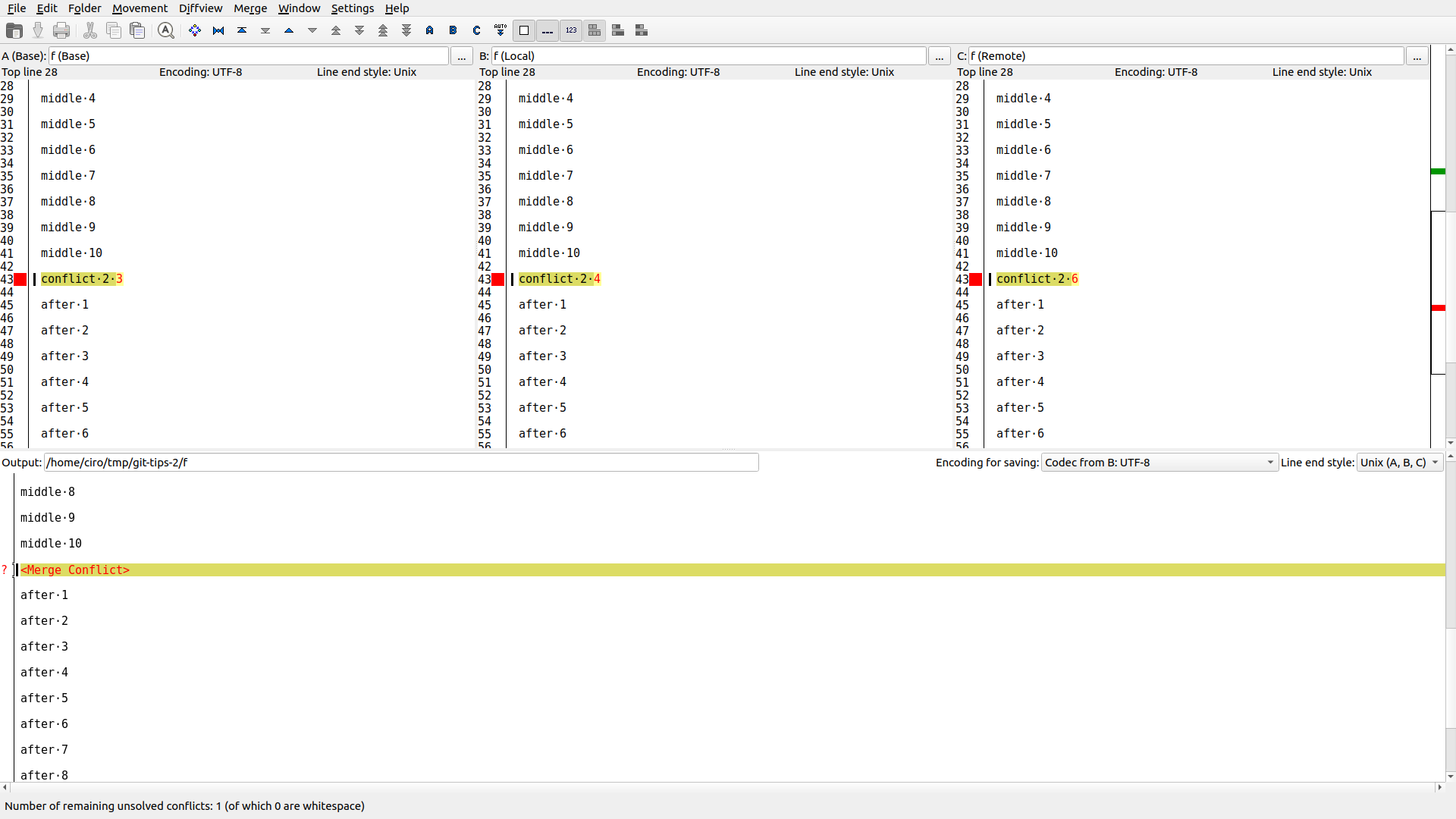
imerge does look promising: stackoverflow.com/questions/18162930/how-can-i-find-out-which-git-commits-cause-conflictsThese are good free newbie GUI options:
sudo apt install meld
git mergetool --tool meld

sudo apt install kdiff3
git mergetool --tool kdiff3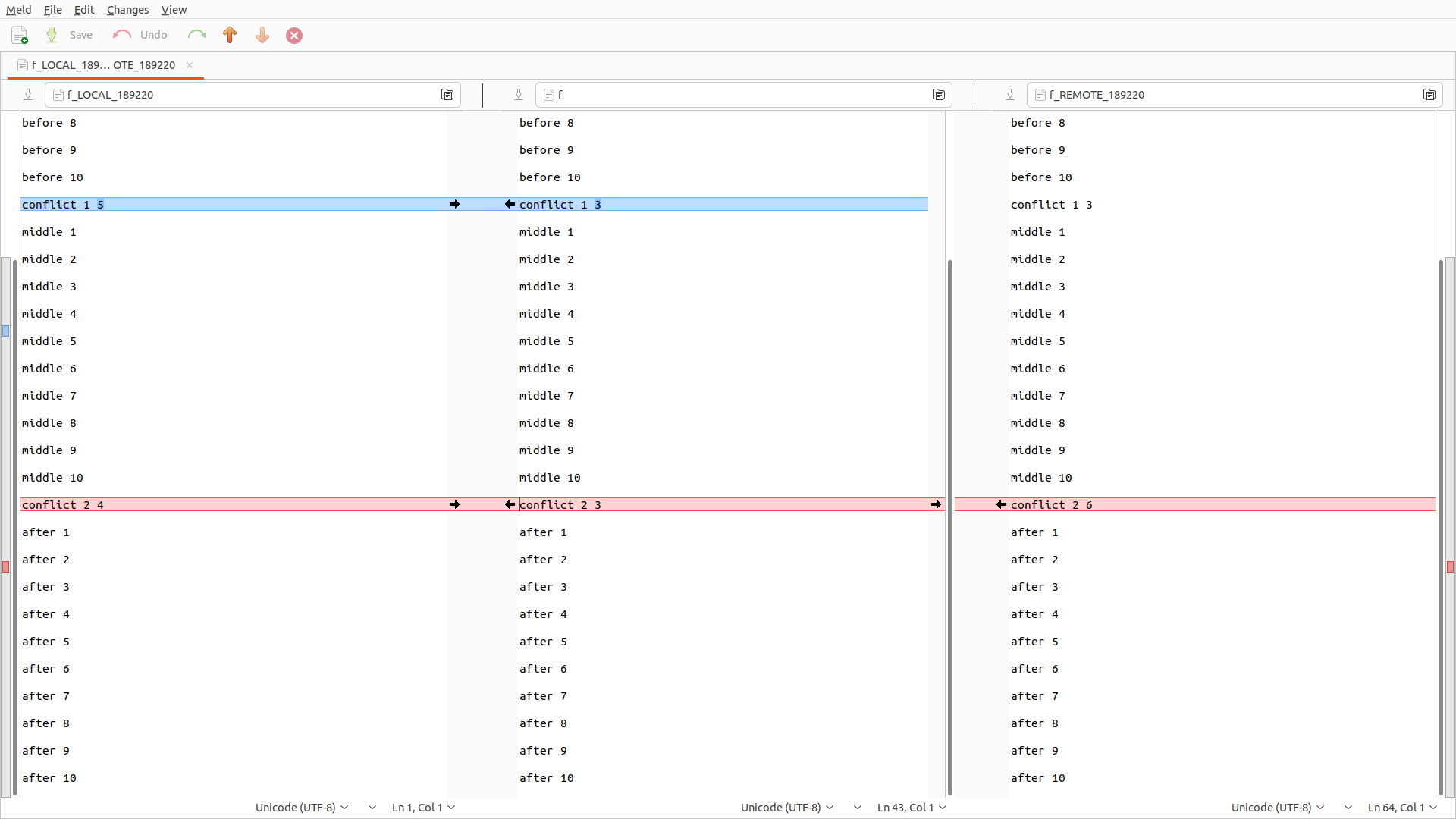
git-tips-2.sh
#!/usr/bin/env bash

set -eux

add() (
  rm -f f
  for i in `seq 10`; do
    printf "before $i\n\n" >> f
  done
  printf "conflict 1 $1\n\n" >> f
  for i in `seq 10`; do
    printf "middle $i\n\n" >> f
  done
  printf "conflict 2 $2\n\n" >> f
  for i in `seq 10`; do
    printf "after $i\n\n" >> f
  done
  git add f
)

rm -rf git-tips-2
mkdir git-tips-2
cd git-tips-2
git init

for i in 1 2 3; do
  add $i $i
  git commit -m $i
done

add 3 4
git commit -m 4

add 5 4
git commit -m 5

git checkout HEAD~2
git checkout -b my-feature

add 3 6
git commit -m 6

add 7 6
git commit -m 7diff3 conflict is basically what you always want to see, either by setting it as the default as per stackoverflow.com/questions/27417656/should-diff3-be-default-conflictstyle-on-git:git config --global merge.conflictstyle diff3git checkout --conflict=diff3With this, conflicts now show up as:
++<<<<<<< HEAD
 +5
++||||||| parent of 7b0f59d (6)
++3
++=======
+ 6
++>>>>>>> 7b0f59d (6)
7b0f59d is the SHA-2 of commit 6.instead of the inferior default:
++<<<<<<< ours
 +5
++=======
+ 6
++>>>>>>> theirs
We can also observe the current tree state during resolution:so we understand that we are now at 5 and that we are trying to apply our commit
* b4ec057 (HEAD, master) 5
* 0b37c1b 4
| * fbfbfe8 (my-feature) 7
| * 7b0f59d 6
|/
* 661cfab 3
* 6d748a9 2
* c5f8a2c 16So it is much clearer what is happening:and so now we have to decide what the new code is that will put both of these together.
We now reach:and the tree looks like:So we understand that:
++<<<<<<< HEAD
 +11
++||||||| parent of fbfbfe8 (7)
++6
++=======
+ 7
++>>>>>>> fbfbfe8 (7)* ca7f7ff (HEAD) 6
* b4ec057 (master) 5
* 0b37c1b 4
| * fbfbfe8 (my-feature) 7
| * 7b0f59d 6
|/
* 661cfab 3
* 6d748a9 2
* c5f8a2c 1and after resolving that one we now reach:
* e1aaf20 (HEAD -> my-feature) 7
* ca7f7ff 6
* b4ec057 (master) 5
* 0b37c1b 4
* 661cfab 3
* 6d748a9 2
* c5f8a2c 1Principal investigator: Simon M. Lucas.
- SQLite with
rowid: stackoverflow.com/questions/8190541/deleting-duplicate-rows-from-sqlite-database - SQL Server has crazy "CTEs" change backing table extension: stackoverflow.com/questions/18390574/how-to-delete-duplicate-rows-in-sql-server
At twitter.com/togelius/status/1328404390114435072 called out on DeepMind Lab2D for not giving them credit on prior work!As seen from web.archive.org/web/20220331022932/http://gvgai.net/ though, DeepMind sponsored them at some point.
This very much looks like like GVGAI which was first released in 2014, been used in dozens (maybe hundreds) of papers, and for which one of the original developers was Tom Schaul at DeepMind...
CIA 2010 covert communication websites Wayback Machine crawl date search by Ciro Santilli 40 Updated 2025-07-16
Ciro Santilli 40 Updated 2025-07-16 CIA 2010 covert communication websites Wayback Machine CDX scanning by Ciro Santilli 40 Updated 2025-07-16
Ciro Santilli 40 Updated 2025-07-16The Wayback Machine has an endpoint to query cralwed pages called the CDX server. It is documented at: github.com/internetarchive/wayback/blob/master/wayback-cdx-server/README.md.
This allows to filter down 10 thousands of possible domains in a few hours. But 100s of thousands would be too much. This is because you have to query exactly one URL at a time, and they possibly rate limit IPs. But no IP blacklisting so far after several hours, so it's not that bad.
Once you have a heuristic to narrow down some domains, you can use this helper: ../cia-2010-covert-communication-websites/cdx.sh to drill them down from 10s of thousands down to hundreds or thousands.
We then post process the results of cdx.sh with ../cia-2010-covert-communication-websites/cdx-post.sh to drill them down from from thousands to dozens, and manually inspect everything.
From then on, you can just manually inspect for hist on your browser.
CIA 2010 covert communication websites Are there .org hits? by Ciro Santilli 40 Updated 2025-07-16
Ciro Santilli 40 Updated 2025-07-16Previously it was unclear if there were any .org hits, until we found the first one with clear comms: web.archive.org/web/20110624203548/http://awfaoi.org/hand.jar
Later on, two more clear ones were found with expired domain trackers:further settling their existence. Later on newimages.org also came to light.
Others that had been previously found in IP ranges but without clear comms:
.org is very rare, and has been excluded from some of our search heuristics. That was a shame, but likely not much was missed.
CIA 2010 covert communication websites feedsdemexicoyelmundo.com JavaScript reverse engineering by Ciro Santilli 40 Updated 2025-07-16
Ciro Santilli 40 Updated 2025-07-16The JavaScript of each website appears to be quite small and similarly sized. They are all minimized, but have reordered things around a bit.
For example consider: web.archive.org/web/20110202190932/http://feedsdemexicoyelmundo.com/mundo.js
First we have to know that the Wayback Machine adds some stuff before and after the original code. The actual code there starts at:and ends in:
ap={fg:['MSXML2.XMLHTTPck++;};return fu;};Further analysis would be needed.
CIA 2010 covert communication websites JavaScript with SHAs by Ciro Santilli 40 Updated 2025-07-16
Ciro Santilli 40 Updated 2025-07-16There are two types of JavaScript found so far. The ones with SHA and the ones without. There are only 2 examples of JS with SHA:Both files start with precisely the same string:
- iraniangoals.com: web.archive.org/web/20110202091909/http://iraniangoals.com/journal.js Commented at: iraniangoals.com JavaScript reverse engineering
- iranfootballsource.com: web.archive.org/web/20110202091901/http://iranfootballsource.com/futbol.js
- kukrinews.com: web.archive.org/web/20100513094909/http://kukrinews.com/news.js
- todaysnewsandweather-ru.com: web.archive.org/web/20110207094735/http://todaysnewsandweather-ru.com/blacksea.js
var ms="\u062F\u0631\u064A\u0627\u0641\u062A\u06CC",lc="\u062A\u0647\u064A\u0647 \u0645\u062A\u0646",mn="\u0628\u0631\u062F\u0627\u0632\u0634 \u062F\u0631 \u062C\u0631\u064A\u0627\u0646 \u0627\u0633\u062A...\u0644\u0637\u0641\u0627 \u0635\u0628\u0631 \u0643\u0646\u064A\u062F",lt="\u062A\u0647\u064A\u0647 \u0645\u062A\u0646",ne="\u067E\u0627\u0633\u062E",kf="\u062E\u0631\u0648\u062C",mb="\u062D\u0630\u0641",mv="\u062F\u0631\u064A\u0627\u0641\u062A\u06CC",nt="\u0627\u0631\u0633\u0627\u0644",ig="\u062B\u0628\u062A \u063A\u0644\u0637. \u062C\u0647\u062A \u062A\u062C\u062F\u064A\u062F \u062B\u0628\u062A \u0635\u0641\u062D\u0647 \u0631\u0627 \u0628\u0627\u0632\u0622\u0648\u0631\u06CC \u06A9\u0646\u064A\u062F",hs="\u063A\u064A\u0631 \u0642\u0627\u0628\u0644 \u0627\u062C\u0631\u0627. \u062E\u0637\u0627 \u062F\u0631 \u0627\u062A\u0651\u0635\u0627\u0644",ji="\u063A\u064A\u0631 \u0642\u0627\u0628\u0644 \u0627\u062C\u0631\u0627. \u062E\u0637\u0627 \u062F\u0631 \u0627\u062A\u0651\u0635\u0627\u0644",ie="\u063A\u064A\u0631 \u0642\u0627\u0628\u0644 \u0627\u062C\u0631\u0627. \u062E\u0637\u0627 \u062F\u0631 \u0627\u062A\u0651\u0635\u0627\u0644",gc="\u0633\u0648\u0627\u0631 \u06A9\u0631\u062F\u0646 \u062A\u06A9\u0645\u064A\u0644 \u0634\u062F",gz="\u0645\u0637\u0645\u0626\u0646\u064A\u062F \u06A9\u0647 \u0645\u064A\u062E\u0648\u0627\u0647\u064A\u062F \u067E\u064A\u0627\u0645 \u0631\u0627 \u062D\u0630\u0641 \u06A9\u0646\u064A\u062F\u061F"Good fingerprint present in all of them:
throw new Error("B64 D.1");};if(at[1]==-1){throw new Error("B64 D.2");};if(at[2]==-1){if(f<ay.length){throw new Error("B64 D.3");};dg=2;}else if(at[3]==-1){if(f<ay.length){throw new Error("B64 D.4") CIA 2010 covert communication websites 2012 Internet Census icmp_ping by Ciro Santilli 40 Updated 2025-07-16
Ciro Santilli 40 Updated 2025-07-16Let's check relevancy of known hits:Output:
grep -e '208.254.40' -e '208.254.42' 208 | tee 208hits208.254.40.95 1355564700 unreachable
208.254.40.95 1355622300 unreachable
208.254.40.96 1334537100 alive, 36342
208.254.40.96 1335269700 alive, 17586
..
208.254.40.127 1355562900 alive, 35023
208.254.40.127 1355593500 alive, 59866
208.254.40.128 1334609100 unreachable
208.254.40.128 1334708100 alive from 208.254.32.214, 43358
208.254.40.128 1336596300 unreachableThe rest of 208 is mostly unreachable.
208.254.42.191	1335294900	unreachable
...
208.254.42.191	1344737700	unreachable
208.254.42.191	1345574700	Icmp Error: 0,ICMP Network Unreachable, from 63.111.123.26
208.254.42.191	1346166900	unreachable
...
208.254.42.191	1355665500	unreachable
208.254.42.192	1334625300	alive, 6672
...
208.254.42.192	1355658300	alive, 57412
208.254.42.193	1334677500	alive, 28985
208.254.42.193	1336524300	unreachable
208.254.42.193	1344447900	alive, 8934
208.254.42.193	1344613500	alive, 24037
208.254.42.193	1344806100	alive, 20410
208.254.42.193	1345162500	alive, 10177
...
208.254.42.223	1336590900	alive, 23284
...
208.254.42.223	1355555700	alive, 58841
208.254.42.224	1334607300	Icmp Type: 11,ICMP Time Exceeded, from 65.214.56.142
208.254.42.224	1334681100	Icmp Type: 11,ICMP Time Exceeded, from 65.214.56.142
208.254.42.224	1336563900	Icmp Type: 11,ICMP Time Exceeded, from 65.214.56.142
208.254.42.224	1344451500	Icmp Type: 11,ICMP Time Exceeded, from 65.214.56.138
208.254.42.224	1344566700	unreachable
208.254.42.224 1344762900 unreachablen=66
time awk '$3~/^alive,/ { print $1 }' $n | uniq -c | sed -r 's/^ +//;s/ /,/' | tee $n-up-uniq-cOK down to 45 MB, now we can work.
grep -e '66.45.179' -e '66.104.169' -e '66.104.173' -e '66.104.175' -e '66.175.106' '66-alive-uniq-c' | tee 66hits CIA 2010 covert communication websites 2012 Internet Census hostprobes by Ciro Santilli 40 Updated 2025-07-16
Ciro Santilli 40 Updated 2025-07-16Hostprobes quick look on two ranges:
208.254.40:
... similar down

208.254.40.95	1334668500	down	no-response
208.254.40.95	1338270300	down	no-response
208.254.40.95	1338839100	down	no-response
208.254.40.95	1339361100	down	no-response
208.254.40.95	1346391900	down	no-response
208.254.40.96	1335806100	up	unknown
208.254.40.96	1336979700	up	unknown
208.254.40.96	1338840900	up	unknown
208.254.40.96	1339454700	up	unknown
208.254.40.96	1346778900	up	echo-reply (0.34s latency).
208.254.40.96	1346838300	up	echo-reply (0.30s latency).
208.254.40.97	1335840300	up	unknown
208.254.40.97	1338446700	up	unknown
208.254.40.97	1339334100	up	unknown
208.254.40.97	1346658300	up	echo-reply (0.26s latency).

... similar up

208.254.40.126	1335708900	up	unknown
208.254.40.126	1338446700	up	unknown
208.254.40.126	1339330500	up	unknown
208.254.40.126	1346494500	up	echo-reply (0.24s latency).
208.254.40.127	1335840300	up	unknown
208.254.40.127	1337793300	up	unknown
208.254.40.127	1338853500	up	unknown
208.254.40.127	1346454900	up	echo-reply (0.23s latency).

208.254.40.128	1335856500	up	unknown
208.254.40.128	1338200100	down	no-response
208.254.40.128	1338749100	down	no-response
208.254.40.128	1339334100	down	no-response
208.254.40.128	1346607900	down	net-unreach
208.254.40.129	1335699900	up	unknown

... similar down
Suggests exactly 127 - 96 + 1 = 31 IPs.
208.254.42:
... similar down

208.254.42.191	1334522700	down	no-response
208.254.42.191	1335276900	down	no-response
208.254.42.191	1335784500	down	no-response
208.254.42.191	1337845500	down	no-response
208.254.42.191	1338752700	down	no-response
208.254.42.191	1339332300	down	no-response
208.254.42.191	1346499900	down	net-unreach

208.254.42.192	1334668500	up	unknown
208.254.42.192	1336808700	up	unknown
208.254.42.192	1339334100	up	unknown
208.254.42.192	1346766300	up	echo-reply (0.40s latency).
208.254.42.193	1335770100	up	unknown
208.254.42.193	1338444900	up	unknown
208.254.42.193	1339334100	up	unknown

... similar up

208.254.42.221	1346517900	up	echo-reply (0.19s latency).
208.254.42.222	1335708900	up	unknown
208.254.42.222	1335708900	up	unknown
208.254.42.222	1338066900	up	unknown
208.254.42.222	1338747300	up	unknown
208.254.42.222	1346872500	up	echo-reply (0.27s latency).
208.254.42.223	1335773700	up	unknown
208.254.42.223	1336949100	up	unknown
208.254.42.223	1338750900	up	unknown
208.254.42.223	1339334100	up	unknown
208.254.42.223	1346854500	up	echo-reply (0.13s latency).

208.254.42.224	1335665700	down	no-response
208.254.42.224	1336567500	down	no-response
208.254.42.224	1338840900	down	no-response
208.254.42.224	1339425900	down	no-response
208.254.42.224	1346494500	down	time-exceeded

... similar down
Suggests exactly 223 - 192 + 1 = 31 IPs.
It does appears that long sequences of ranges are a sort of fingerprint. The question is how unique it would be.
First:This reduces us to 2 million IP rows from the total possible 16 million IPs.
n=208
time awk '$3=="up"{ print $1 }' $n | uniq -c | sed -r 's/^ +//;s/ /,/' | tee $n-up-uniq
t=$n-up-uniq.sqlite
rm -f $t
time sqlite3 $t 'create table tmp(cnt text, i text)'
time sqlite3 $t ".import --csv $n-up-uniq tmp"
time sqlite3 $t 'create table t (i integer)'
time sqlite3 $t '.load ./ip' 'insert into t select str2ipv4(i) from tmp'
time sqlite3 $t 'drop table tmp'
time sqlite3 $t 'create index ti on t(i)'OK now just counting hits on fixed windows has way too many results:
sqlite3 208-up-uniq.sqlite "\
SELECT * FROM (
  SELECT min(i), COUNT(*) OVER (
    ORDER BY i RANGE BETWEEN 15 PRECEDING AND 15 FOLLOWING
  ) as c FROM t
) WHERE c > 20 and c < 30
"Let's try instead consecutive ranges of length exactly 31 instead then:271. Hmm. A bit more than we'd like...
sqlite3 208-up-uniq.sqlite <<EOF
SELECT f, t - f as c FROM (
  SELECT min(i) as f, max(i) as t
  FROM (SELECT i, ROW_NUMBER() OVER (ORDER BY i) - i as grp FROM t)
  GROUP BY grp
  ORDER BY i
) where c = 31
EOFAnother route is to also count the ups:
n=208
time awk '$3=="up"{ print $1 }' $n | uniq -c | sed -r 's/^ +//;s/ /,/' | tee $n-up-uniq-cnt
t=$n-up-uniq-cnt.sqlite
rm -f $t
time sqlite3 $t 'create table tmp(cnt text, i text)'
time sqlite3 $t ".import --csv $n-up-uniq-cnt tmp"
time sqlite3 $t 'create table t (cnt integer, i integer)'
time sqlite3 $t '.load ./ip' 'insert into t select cnt as integer, str2ipv4(i) from tmp'
time sqlite3 $t 'drop table tmp'
time sqlite3 $t 'create index ti on t(i)'Let's see how many consecutives with counts:
sqlite3 208-up-uniq-cnt.sqlite <<EOF
SELECT f, t - f as c FROM (
  SELECT min(i) as f, max(i) as t
  FROM (SELECT i, ROW_NUMBER() OVER (ORDER BY i) - i as grp FROM t WHERE cnt >= 3)
  GROUP BY grp
  ORDER BY i
) where c > 28 and c < 32
EOFLet's check on 66:not representative at all... e.g. several convfirmed hits are down:
grep -e '66.45.179' -e '66.45.179' 6666.45.179.215 1335305700 down no-response
66.45.179.215 1337579100 down no-response
66.45.179.215 1338765300 down no-response
66.45.179.215 1340271900 down no-response
66.45.179.215 1346813100 down no-response Pinned article: Introduction to the OurBigBook Project
Welcome to the OurBigBook Project! Our goal is to create the perfect publishing platform for STEM subjects, and get university-level students to write the best free STEM tutorials ever.
Everyone is welcome to create an account and play with the site: ourbigbook.com/go/register. We belive that students themselves can write amazing tutorials, but teachers are welcome too. You can write about anything you want, it doesn't have to be STEM or even educational. Silly test content is very welcome and you won't be penalized in any way. Just keep it legal!
Intro to OurBigBook
. Source. We have two killer features:
- topics: topics group articles by different users with the same title, e.g. here is the topic for the "Fundamental Theorem of Calculus" ourbigbook.com/go/topic/fundamental-theorem-of-calculusArticles of different users are sorted by upvote within each article page. This feature is a bit like:
- a Wikipedia where each user can have their own version of each article
- a Q&A website like Stack Overflow, where multiple people can give their views on a given topic, and the best ones are sorted by upvote. Except you don't need to wait for someone to ask first, and any topic goes, no matter how narrow or broad
This feature makes it possible for readers to find better explanations of any topic created by other writers. And it allows writers to create an explanation in a place that readers might actually find it.
Figure 1. Screenshot of the "Derivative" topic page. View it live at: ourbigbook.com/go/topic/derivativeVideo 2. OurBigBook Web topics demo. Source. - local editing: you can store all your personal knowledge base content locally in a plaintext markup format that can be edited locally and published either:This way you can be sure that even if OurBigBook.com were to go down one day (which we have no plans to do as it is quite cheap to host!), your content will still be perfectly readable as a static site.
- to OurBigBook.com to get awesome multi-user features like topics and likes
- as HTML files to a static website, which you can host yourself for free on many external providers like GitHub Pages, and remain in full control

Figure 2. You can publish local OurBigBook lightweight markup files to either OurBigBook.com or as a static website.
Figure 3. Visual Studio Code extension installation.
Figure 5. . You can also edit articles on the Web editor without installing anything locally. Video 3. Edit locally and publish demo. Source. This shows editing OurBigBook Markup and publishing it using the Visual Studio Code extension. 
- Infinitely deep tables of contents:


All our software is open source and hosted at: github.com/ourbigbook/ourbigbook
Further documentation can be found at: docs.ourbigbook.com
Feel free to reach our to us for any help or suggestions: docs.ourbigbook.com/#contact