
A numerical value retained for reuse by memoization. It is usable only while the spreadsheet formula and all its relevant inputs remain valid. After changing
A1 from 3 to 5, following outgoing directed edges finds exactly B1,B2,C1,D1. Invalidate their cached cell values before evaluating another requested result; install the new input value for A1. The cached cell values of A2 and E1 remain valid because neither has a directed path from A1.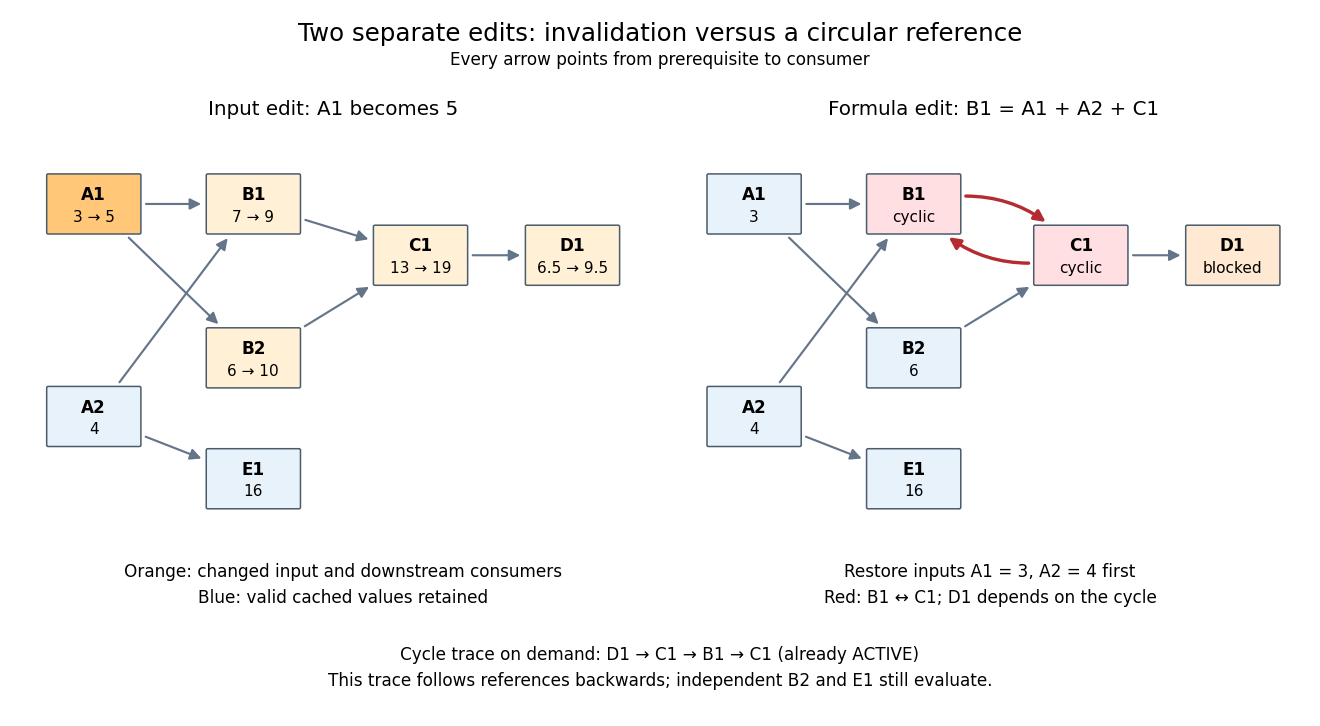
Downstream invalidation after an input edit, and a different formula edit creating a spreadsheet circular reference
. Details. 
One recomputation in the restricted topological order
B1,B2,C1,D1 gives . Four spreadsheet formulas are recomputed, while E1 stays at 16. Removing invalid values from the cache prevents a subtle error: a finished marker from the previous evaluation does not prove that the old value is correct after an edit. The affected set is conservative; a changed prerequisite might leave a consumer's value numerically equal, but this simple scheme still invalidates it. For a formula edit, update the incoming directed edges and corresponding outgoing consumer lists as well as invalidating the edited spreadsheet cell and its downstream consumers. Microsoft's documentation explicitly describes both direct and indirect dependents being marked for recalculation.[ref]Excel Recalculation by Microsoft. Dependence, Dirty Cells, and Recalculated Cells: paragraph beginning “When a structural change is made”; B1/A1 and C1/B1 dirty-cell example
For demand-driven evaluation, memoization combines with depth-first search. Each spreadsheet cell has one of three states:
UNSEEN means no valid cached cell value; ACTIVE means its evaluation is on the current call stack; FINISHED means a valid value is available. Initialize valid input spreadsheet cells as FINISHED. Start with all spreadsheet formulas UNSEEN, or retain only valid FINISHED entries after invalidation. The following original algorithm uses an ordered references list and an apply_formula operation for each spreadsheet formula:def value(cell):
if state[cell] == FINISHED:
return cache[cell]
if state[cell] == ACTIVE:
i = stack.index(cell)
raise CircularReference(stack[i:] + [cell])
state[cell] = ACTIVE
stack.append(cell)
try:
args = [value(p) for p in references[cell]]
cache[cell] = apply_formula(cell, args)
state[cell] = FINISHED
return cache[cell]
except Exception:
state[cell] = UNSEEN
raise
finally:
stack.pop()Requesting
D1 first makes D1,C1,B1 active, then reads the finished inputs A1,A2. B1 finishes at 7. Evaluating B2 reuses the finished value of A1 and finishes at 6; C1 finishes at 13 and D1 at . A later request for D1 immediately returns its cached cell value. The shared prerequisite A1 is not a directed cycle: it was finished before the second request. The crucial distinction is between a previously visited vertex and a still-active vertex. The exceptional path restores unfinished states while unwinding the call stack, so failed evaluations are not cached as successful results. MIT's depth-first search notes use stack-duration marks to distinguish an edge to an active ancestor and to detect a directed cycle.[ref]Lecture 14: Graphs II: Depth-First Search. Lecture 14: Graphs II: Depth-First Search, printed pp. 3–4: stack-duration marks and cycle detection
With adjacency lists and constant-time state/cache access, the structural work of a successful demand-driven evaluation is in big O notation, where and are the requested spreadsheet cells and their recursively reached prerequisites and references. Each reached spreadsheet formula is computed once; each reference is inspected once. This time complexity counts dependency bookkeeping separately from the cost of the arithmetic operations. Detecting a spreadsheet circular reference can additionally scan the current call stack once to report its witness.
New to topics? Read the docs here!