Matrix multiplication example.
Fundamental since deep learning is mostly matrix multiplication.
NumPy does not automatically use the GPU for it: stackoverflow.com/questions/49605231/does-numpy-automatically-detect-and-use-gpu, and PyTorch is one of the most notable compatible implementations, as it uses the same memory structure as NumPy arrays.
Sample runs on P51 to observe the GPU speedup:
$ time ./matmul.py g 10000 1000 10000 100
real    0m22.980s
user    0m22.679s
sys     0m1.129s
$ time ./matmul.py c 10000 1000 10000 100
real    1m9.924s
user    4m16.213s
sys 0m17.293sContains several computer vision models, e.g. ResNet, all of them including pre-trained versions on some dataset, which is quite sweet.
Documentation: pytorch.org/vision/stable/index.html
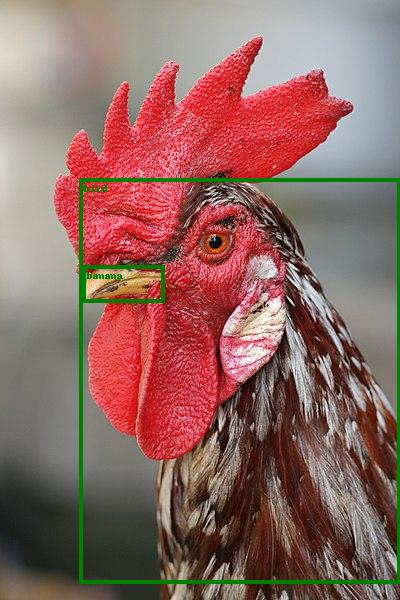
pytorch.org/vision/0.13/models.html has a minimal runnable example adapted to python/pytorch/resnet_demo.py.
That example uses a ResNet pre-trained on the COCO dataset to do some inference, tested on Ubuntu 22.10:This first downloads the model, which is currently 167 MB.
cd python/pytorch
wget -O resnet_demo_in.jpg https://upload.wikimedia.org/wikipedia/commons/thumb/6/60/Rooster_portrait2.jpg/330px-Rooster_portrait2.jpg
./resnet_demo.py resnet_demo_in.jpg resnet_demo_out.jpgWe know it is COCO because of the docs: pytorch.org/vision/0.13/models/generated/torchvision.models.detection.fasterrcnn_resnet50_fpn_v2.html which explains that is an alias for:
FasterRCNN_ResNet50_FPN_V2_Weights.DEFAULTFasterRCNN_ResNet50_FPN_V2_Weights.COCO_V1After it finishes, the program prints the recognized classes:so we get the expected
['bird', 'banana']bird, but also the more intriguing banana.
Articles by others on the same topic


PyTorch is a software framework for numerical tensor operations and machine learning, including automatic differentiation and tools for training neural networks. Its array operations provide the calculations; its differentiation machinery records how a result depends on selected inputs. A computed gradient is distinct from the later optimization step that uses it.[ref]
Automatic Differentiation with torch.autograd in the PyTorch tutorials. Tensors, Functions and Computational graph; Computing Gradients
import torch
x = torch.tensor(2.0, requires_grad=True)
y = x * x + 3 * x
y.backward()
print(x.grad)  # tensor(7.)
The result agrees with . The call to
backward() computes and accumulates derivatives; it does not itself change x to minimize y. In a training loop, parameter updates and clearing old gradients are separate operations.[ref]Optimizing Model Parameters in the PyTorch tutorials. Optimizing with torch.optim; zero_grad, backward and step
A useful consequence of its dynamically constructed computation is that executed control flow determines the recorded graph. Recording a new graph on the next execution makes it possible to differentiate the computation that actually ran. Disabling gradient tracking or detaching a value changes that connection and must be deliberate.[ref]
Automatic Differentiation with torch.autograd in the PyTorch tutorials. More on Computational Graphs; Disabling Gradient Tracking