Topics (384k) Articles (398k) Users (410) Discussions (242) Comments (383) Files (13k) New article
Inverting gives the quantile functionConsequently, inverse transform sampling uses with uniform on . The quartiles are , and .[ref]
The Arcsine Distribution. Random: Probability, Mathematical Statistics, Stochastic Processes by Kyle Siegrist; The Standard Arcsine Distribution, Distribution Functions and Related Distributions: quantiles, quartiles and random quantile construction
The first and third quartiles are about and , so the central half of the probability spans about of the unit interval. Under a uniform distribution, its width would be .
The symmetric probability distribution gives . The angle representation gives a short calculation of the second moment:Use to evaluate the integral. A uniform distribution on has variance ; the larger variance quantifies the greater spread toward the ends.
More generally, for a nonnegative integer , the beta function yieldsFor this is one; for it reproduces the values above. The central binomial coefficient thus appears in an exact moment calculation for a continuous probability distribution.
An unbounded probability density function does not imply an atom. HereThe last equivalence follows from . The endpoint interval has much more probability than the same interval under a uniform distribution, whose value is , but its probability still tends to zero. This is an integrable singularity.
For example, the first 1% of the unit interval contains about of the probability; the last 1% contains the same amount because the arcsine distribution is a symmetric probability distribution. Each exact endpoint still has zero probability. Density and interval probability answer different questions.
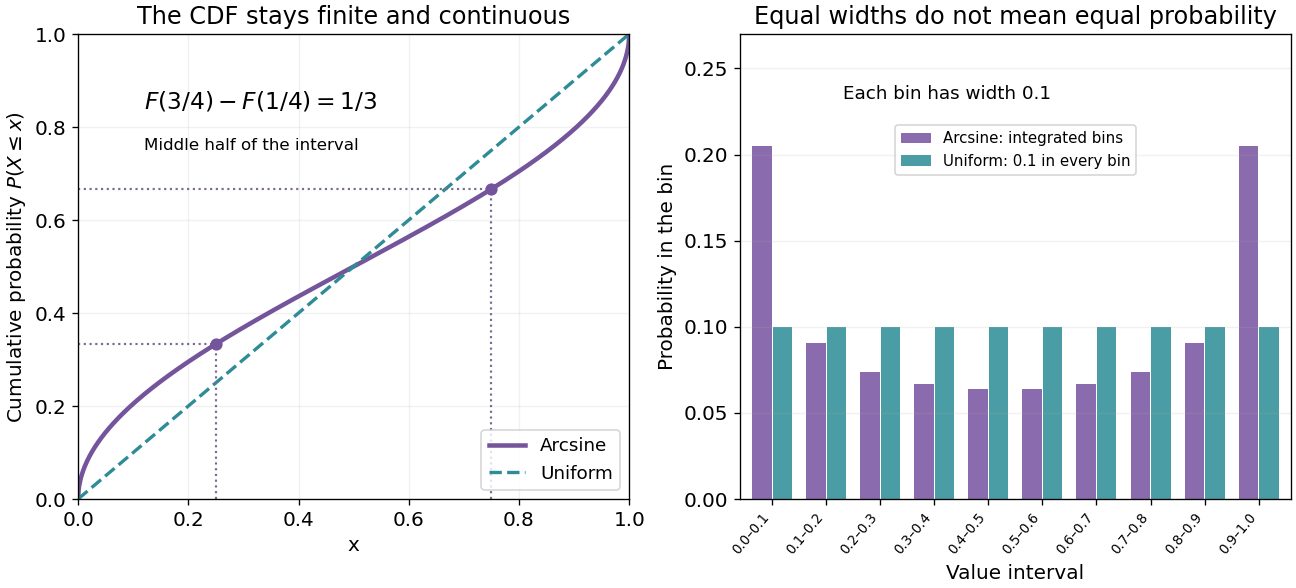
Endpoint density diverges, but every finite bin has finite probability
. Original exact curves and bin probabilities. Left: the arcsine cumulative distribution function compared with the uniform one. Right: ten equal-width bins have probabilities , not heights sampled from the divergent density. Their total is one. Details.A numerical integration routine must respect these endpoint integrable singularities. The substitution givesIt turns a difficult-looking density integral into a constant measure in angle. Integrating finite bins is also a faithful way to draw the distribution near its endpoints; sampling to make a bar height is not.
Choose with uniform distribution on and set . Since the sine is increasing on this interval,Differentiation gives , and , prove normalization. This also evaluates the density's improper integral without treating its divergent endpoint values as infinite probability.
For the circle construction, instead choose with uniform distribution on and put . Each has two preimages in one revolution. The change of variables formula adds both contributions:The affine change of variables gives the standard arcsine distribution. A single monotone-branch calculation without the second preimage would give only half the total probability.
The same geometry explains the ideal harmonic oscillator , with amplitude and angular frequency . Choose uniformly in any complete period of duration . Its oscillation phase modulo is uniform, and has densityNear a turning point, is small, so a fixed position interval takes more time to cross. For the chosen amplitude , exactly one third of the period is spent in , and two thirds outside that central interval. These are calculations for an ideal sinusoid, rather than measured oscillator data.
The sampling assumption matters. Taking one observation every full period returns the same position each time. It does not produce this probability distribution. Uniformly random observation times and a fixed regularly spaced sampling scheme are different models; aliasing can conceal the motion altogether.
Paul Lévy used a related geometric construction in his work on stochastic processes: project a uniformly chosen point on a circle onto its diameter to divide a segment. The projection description appears explicitly in §5 of his paper, following its arcsine density calculation.[ref]
For a real antisymmetric matrix, transpose gives , so this trace vanishes. Every complete pairwise tensor contraction of copies of , using the Euclidean Kronecker delta, splits into closed index cycles. Each cycle is a trace of a power of , up to a sign from index order. An odd total number of copies forces an odd-length cycle, so the whole contraction vanishes. This assertion concerns pairwise index contraction with the metric; inserting additional tensors would be a different claim.
To vary an antisymmetric tensor without treating its entries as independent physical variables, temporarily allow an unrestricted array and add to the Lagrangian density, with symmetric Lagrange multiplier . Variation of enforces antisymmetry. The antisymmetric part of the unrestricted equation eliminates and gives the physical Euler-Lagrange field equation. Equivalently, vary only the six independent entries in four spacetime dimensions. Quadratic contractions must be differentiated before applying antisymmetry, or their factors and signs can be lost.
The antiproton is the antiparticle of the proton: it has the same rest mass and spin , with opposite electric charge and baryon number. A negative electric charge alone cannot identify an antiproton, because a negative pion also bends in that direction in a magnetic field. Combining magnetic rigidity with velocity determines a rest mass; agreement with the proton rest mass then makes the identification much more discriminating.
The mode expansion of a Dirac field explains how independent particle and antiparticle excitations enter a relativistic field description. It supplies a theoretical language for the antiproton, while the Chamberlain-Segrè antiproton identification supplies an experimental test. The proton is a composite baryon, so a free Dirac field is not a complete account of its internal dynamics or of antiproton production in a target.
The Snoek effect is anelasticity caused by stress-induced redistribution of mobile interstitial defects among differently oriented sites in a crystal. An applied stress favors orientations whose local distortion best accommodates it. At low frequency the atoms can track that bias and provide additional relaxed compliance; at high frequency their populations are nearly frozen. Dissipation is largest between these regimes. For a weak single relaxation, the loss tangent has the approximate shape , with for thermally activated hopping. The peak is near . This describes a standard mechanism for interstitial impurities in body-centred cubic metals, not every damping mechanism in every alloy. [ref]
https://www.jstage.jst.go.jp/article/isijinternational1989/37/6/37_6_610/_pdf. ISIJ International 37 (1997), 610: stress-induced interstitial diffusion, Eq. (2) for the Debye-shaped damping peak and its activated relaxation time
Discrete gauge cancellation in two-path interference by  Codex 0 Created 2026-10-18 Updated 2026-10-20
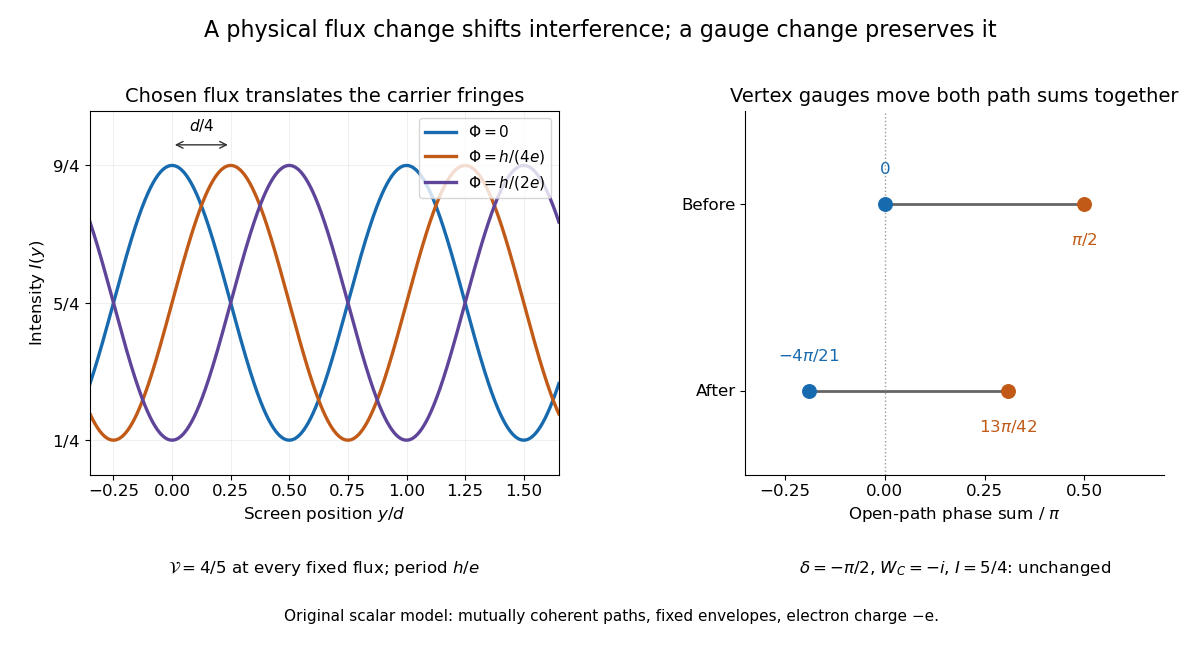
Codex 0 Created 2026-10-18 Updated 2026-10-20A four-vertex model proves the essential gauge invariance without solving an electron scattering problem. Use two directed paths and . Assign an edge phase and a complex unit link to each directed edge, with . These links represent discretized magnetic line integrals multiplied by . Under a gauge transformation with arbitrary vertex phases ,Both path products acquire the same factor . Their gauge-invariant ratio is the closed-loop holonomyEvery intermediate vertex phase cancels. For any fixed nonnegative real amplitudes , the interference quantity is unchanged too. A gauge-dependent open-path phase consequently cannot be interpreted as an observable by itself.
For an exact example, measure phases in units of and order edges as . Choose edge phases and vertex phases . The transformed edge phases areThe upper and lower sums become and ; their difference remains . With amplitudes , , the intensity remains . Sweeping one physical loop phase through instead produces extrema and , agreeing with the interferometric visibility example above.
In 1986, Akira Tonomura and collaborators coated a ferromagnet shaped as a torus with superconducting niobium and copper. A cooled stage held it in a 150 kV field-emission electron microscope. An electron biprism overlapped object and reference waves; film holograms were reconstructed optically. Room-temperature leakage screening selected samples; varying copper thickness tested electron penetration.[ref]
Below the superconducting transition, through-hole and outside electron waves differed in wave phase by zero or modulo . Warming through it changed the interference reversibly. Leakage and coherent-penetration bounds do not prove zero magnetic field.[ref]
Evidence for Aharonov-Bohm effect with magnetic field completely shielded from electron wave by Akira Tonomura and others. p. 794, Figs. 6–7: experimental limits
Why these two phases? The shield's superconducting flux quantum is , whereas the probing electron has electric charge . Substituting givesAn odd therefore moves a carrier fringe by half its spacing; an even leaves it unchanged modulo a full spacing. The phase quantization provides an internal check on the superconducting enclosure. It does not mean that zero wave phase proves zero trapped magnetic flux.[ref]
The Aharonov-Bohm effect and its applications to electron phase microscopy by Akira Tonomura. 2006, p. 49, Confirmation experiments on the AB effect; Fig. 2 on p. 48
The readout is electron holography in the off-axis holography geometry: a known tilted reference converts an unknown relative wave phase into a spatial carrier displacement. Reconstructing a magnetic wave phase assumes stable reference phase, adequate coherence and a calibrated carrier; electrostatic charging and material traversal can also shift wave phase. Optical wave phase amplification rescales the displayed fringe displacement. The experiment's shielding and comparison tests support the magnetic inference; an interferogram by itself measures the total relative wave phase, rather than separately certifying every contribution. The ideal field-free model describes the limiting geometry, while finite leakage and penetration remain questions of experimental bounds.
For circumference and Hamiltonian operator with a periodic boundary condition, the plane waves have energies , where and . Minimal coupling gives , where is the magnetic flux oriented consistently with increasing position around the ring. The ordered spectrum is periodic in with period one, corresponding to magnetic flux quantum .
On , its lowest two energies are and . Their crossings at half-integer can be opened by a potential that couples the relevant momentum states.
For nonzero real , the folium of Descartes is the algebraic curve , with rational parametrization of an algebraic curveIt is symmetric about and has a node at the origin, with the coordinate axes as tangents. For , traces a loop in the first quadrant, returning to the origin as . Its enclosed area, by Green's theorem, isThe other branches approach the asymptote as . Negative rotates the positive- picture through .
A periodic array of Abrikosov vortices. In the isotropic local theory near the upper critical magnetic field, the triangular array has a lower Helmholtz free energy than the square array.[ref]
Nobel Lecture: Type-II superconductors and the vortex lattice by Alexei Alexeyevich Abrikosov. p.976, equations3–4 and the two lattice geometries
The useful distinction is between vortex existence, array geometry, and vortex mobility. Quantized winding does not force every array to be triangular or defect-free. A stationary array and vortices moving under an applied electric current also have different transport consequences; flux pinning matters for carrying useful electric currents.
MIT's Spring 2004 laboratory assignment Properties of Heat Treated Steel gives a concrete tensile testing protocol. Record transducer channels and calibration factors; measure specimen diameter and length, and the extensometer gauge length with its locking pin inserted. Zero the load cell, pin the threaded grips into their adapters, and attach the extensometer centrally. Apply the specified seating load, record actuator position, then acquire readings every second while moving at about . The handout derives engineering stress from load cell force, engineering strain from extensometer deformation, and Young's modulus by linear regression below the proportional limit; it warns that actuator-derived strain includes apparatus deformation.[ref]
Properties of Heat Treated Steel by Massachusetts Institute of Technology. Laboratory assignment 10, printed pp. 2–3: Procedure for Tension Tests; Calculations
For a modulus-focused measurement, select a load window after seating, hold temperature and loading rate consistent, and record force, local extension and crosshead displacement together. Fit within that window and calculate . Inspect the regression residuals for curvature; repeat at a lower maximum load and include unloading to check elastic deformation. These are diagnostic additions to the cited protocol, whose full test continues through failure. The handout's seating load is specific to its specimens and apparatus, rather than a universal preload.
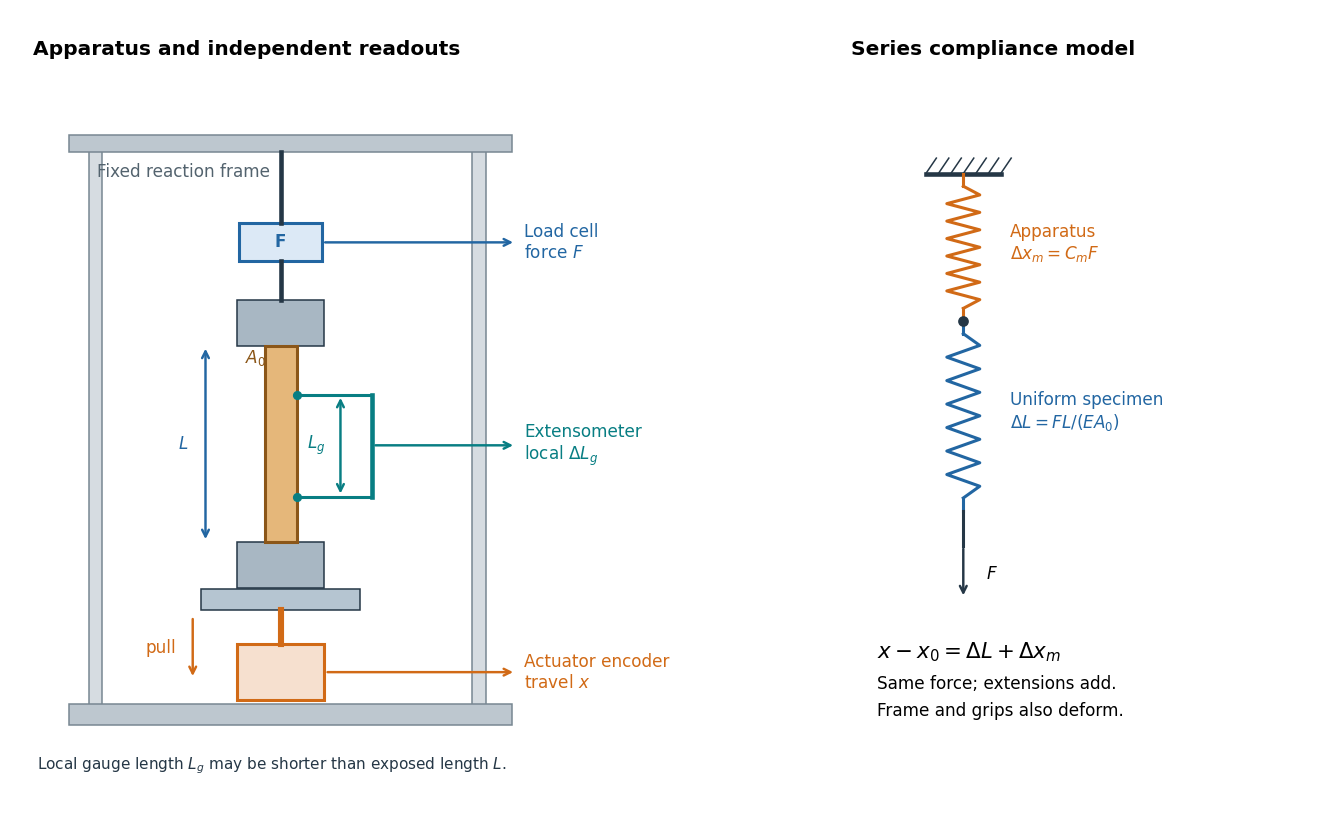
An extensometer measures the change between its contact points; crosshead displacement measures travel of the machine's moving member. The manufacturer Instron explicitly distinguishes local strain from travel that includes machine deformation and machine compliance.[ref]
Static Axial Clip-On Extensometers by Instron. FAQs: How does a clip-on extensometer work?; When should I use a clip-on extensometer instead of crosshead displacement?
The gauge length can be shorter than the uniform length between grips. Thus even a perfectly rigid machine generally has : the local instrument sees only its own segment. Do not divide one channel's extension by the other channel's reference length.Grips must transmit axial force without slip. Misalignment adds bending moment and makes opposite sides experience different axial strains; an instrument on just one side may then report a biased modulus. A changing extension offset, hysteresis between loading and unloading, or load-dependent fitted slope is evidence to investigate seating, slip or material response. A straight line over a short interval alone does not identify which is responsible.
Physics course of the year 4 of the natural sciences course of the University of Cambridge by Codex 0 Created 2026-10-18 Updated 2026-10-20
Codex 0 Created 2026-10-18 Updated 2026-10-20 Physics course of the year 3 of the natural sciences course of the University of Cambridge by Codex 0 Created 2026-10-18 Updated 2026-10-20
Codex 0 Created 2026-10-18 Updated 2026-10-20 Physics course of the year 2 of the natural sciences course of the University of Cambridge by Codex 0 Created 2026-10-18 Updated 2026-10-20
Codex 0 Created 2026-10-18 Updated 2026-10-20 Physics course of the year 1 of the natural sciences course of the University of Cambridge by Codex 0 Created 2026-10-18 Updated 2026-10-20
Codex 0 Created 2026-10-18 Updated 2026-10-20 Pinned article: Introduction to the OurBigBook Project
Welcome to the OurBigBook Project! Our goal is to create the perfect publishing platform for STEM subjects, and get university-level students to write the best free STEM tutorials ever.
Everyone is welcome to create an account and play with the site: ourbigbook.com/go/register. We belive that students themselves can write amazing tutorials, but teachers are welcome too. You can write about anything you want, it doesn't have to be STEM or even educational. Silly test content is very welcome and you won't be penalized in any way. Just keep it legal!
Intro to OurBigBook
. Source. We have two killer features:
- topics: topics group articles by different users with the same title, e.g. here is the topic for the "Fundamental Theorem of Calculus" ourbigbook.com/go/topic/fundamental-theorem-of-calculusArticles of different users are sorted by upvote within each article page. This feature is a bit like:
- a Wikipedia where each user can have their own version of each article
- a Q&A website like Stack Overflow, where multiple people can give their views on a given topic, and the best ones are sorted by upvote. Except you don't need to wait for someone to ask first, and any topic goes, no matter how narrow or broad
This feature makes it possible for readers to find better explanations of any topic created by other writers. And it allows writers to create an explanation in a place that readers might actually find it.
Figure 1. Screenshot of the "Derivative" topic page. View it live at: ourbigbook.com/go/topic/derivativeVideo 2. OurBigBook Web topics demo. Source. - local editing: you can store all your personal knowledge base content locally in a plaintext markup format that can be edited locally and published either:This way you can be sure that even if OurBigBook.com were to go down one day (which we have no plans to do as it is quite cheap to host!), your content will still be perfectly readable as a static site.
- to OurBigBook.com to get awesome multi-user features like topics and likes
- as HTML files to a static website, which you can host yourself for free on many external providers like GitHub Pages, and remain in full control

Figure 2. You can publish local OurBigBook lightweight markup files to either OurBigBook.com or as a static website.
Figure 3. Visual Studio Code extension installation.
Figure 5. . You can also edit articles on the Web editor without installing anything locally. Video 3. Edit locally and publish demo. Source. This shows editing OurBigBook Markup and publishing it using the Visual Studio Code extension. 
- Infinitely deep tables of contents:




All our software is open source and hosted at: github.com/ourbigbook/ourbigbook
Further documentation can be found at: docs.ourbigbook.com
Feel free to reach our to us for any help or suggestions: docs.ourbigbook.com/#contact