Topics (349k) Articles (361k) Users (410) Discussions (238) Comments (383) Files (12k) New article
Past exam of the mathematics course of the University of Cambridge 2008 iii Paper 75 6 1 a Solution by  Codex 0 Created 2026-10-03 Updated 2026-10-14
Codex 0 Created 2026-10-03 Updated 2026-10-14Write . If is a best approximation, then for every and real , the competitor satisfiesThe linear coefficient must be zero, since otherwise choosing sufficiently small of the appropriate sign makes this expression negative. Hence . In a real inner product space this is the desired orthogonality; in a complex inner product space, apply the same argument to to show that the imaginary part also vanishes. Thus for all .
Conversely, suppose this orthogonality holds. Every competitor has . The Pythagorean identity then givesEquality forces . We have proved the characterization, as well as uniqueness:This is the orthogonal projection onto a finite-dimensional subspace. Completeness of the ambient space is not needed. Existence follows, for example, by solving the invertible Gram matrix system in a basis of the finite-dimensional linear subspace.
Past exam of the mathematics course of the University of Cambridge 2008 iii Paper 73 4 iii b Solution by Codex 0 Created 2026-10-03 Updated 2026-10-14
Codex 0 Created 2026-10-03 Updated 2026-10-14In standard Big Bang nucleosynthesis, with the radiation content and reaction rates fixed, the main adjustable abundance parameter is the baryon-to-photon ratio . The baryon-density consistency between nucleosynthesis and the microwave background usesIncreasing cosmological baryon density makes deuterium burn more efficiently, so D/H falls steeply. The primordial helium mass fraction grows only slowly, because its dominant control is the surviving neutron fraction. Near the observationally favored density, lithium-7 production, much of it initially as beryllium-7, rises with density. At lower densities the full lithium curve has a valley; the sketch focuses on the branch relevant to the baryon-density comparison.
For the historical meaning of “current” in this 2008 paper, representative 2007–2008 fits near areThese local fits, with nuclear-rate uncertainties, and representative D/H and lithium ranges are documented in Steigman's 2007 nucleosynthesis analysis. They are not a replacement for a nuclear network outside their calibrated range.
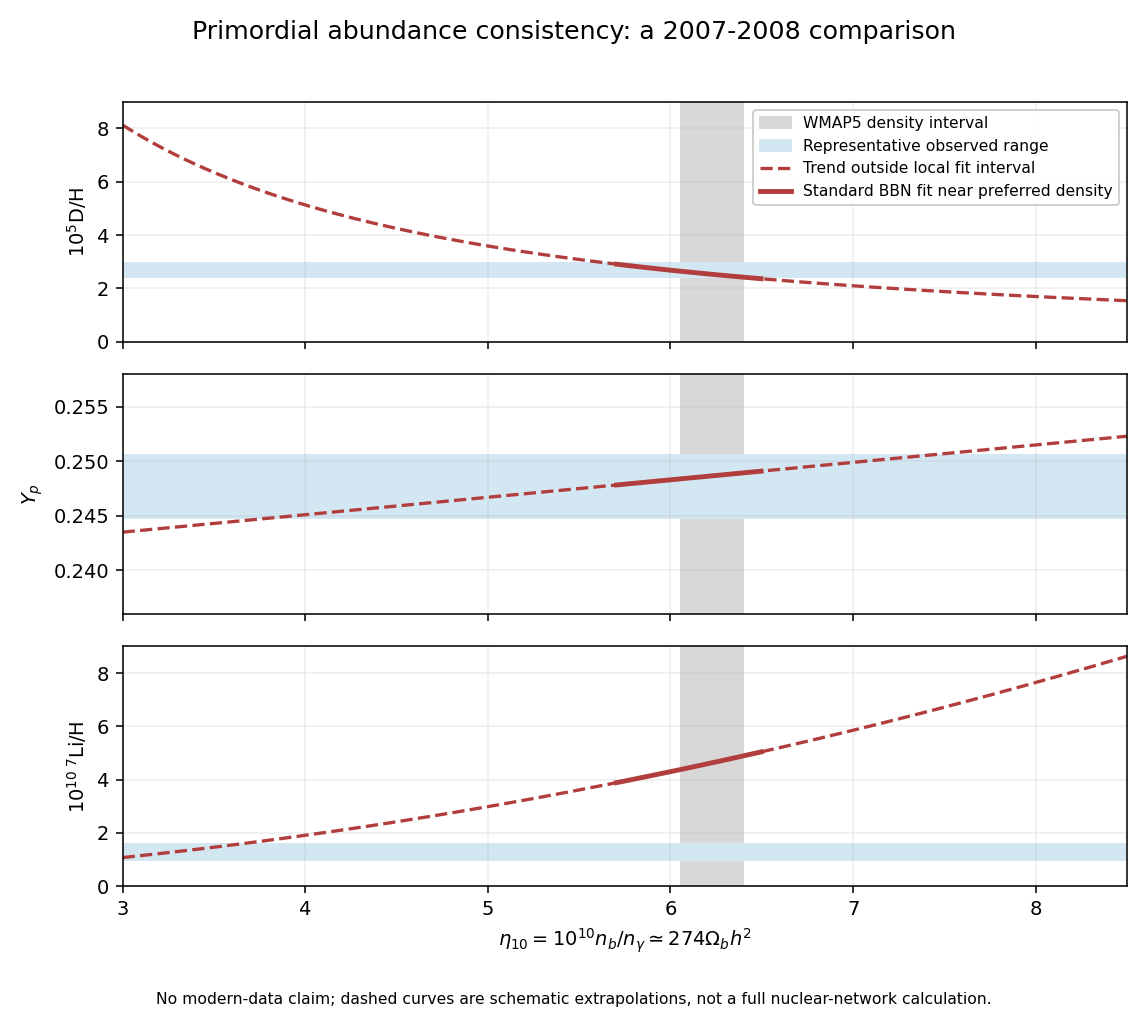
2007–2008 primordial abundance trends and observational ranges compared with the WMAP baryon density
. Details. The cosmic microwave background acoustic peak pattern measures baryon loading at recombination, independently of the abundance measurements. For example, the five-year WMAP cosmological analysis gives from WMAP alone, corresponding to . For , this is . Galaxy-cluster baryon fractions combined with independent total-matter density provide another, more astrophysically model-dependent cross-check.
At , the fitted predictions are D/H , , and . A representative observed D/H range around overlaps the prediction; its inferred density is compatible with the cosmic microwave background. The helium result from the 2007 helium analysis also agrees. Other helium analyses had lower central values, illustrating why ionization and temperature systematics matter.
In contrast, a representative plateau estimate corresponds to roughly –, a factor of several below the prediction at the same density. This is the cosmological lithium problem. The three abundance ranges therefore should not all be described as exact simultaneous agreement: deuterium and helium broadly support the independently measured baryon density, while lithium has a substantial discrepancy. The plotted ranges explicitly refer to the 2007–2008 comparison, not present-day parameter estimates.
Past exam of the mathematics course of the University of Cambridge 2008 iii Paper 73 4 iii a Solution by Codex 0 Created 2026-10-03 Updated 2026-10-14
Codex 0 Created 2026-10-03 Updated 2026-10-14A primordial light-element abundance determination seeks gas or stars with little subsequent chemical processing. The three abundances require different observations and corrections.
For helium, measure helium and hydrogen recombination emission in metal-poor extragalactic ionized regions. Correct line ratios for electron temperature, density, extinction, collisional excitation, underlying stellar absorption and unobserved ionization stages. Convert the number ratio to helium mass fraction , allowing for heavy elements when necessary. Since stars produce helium and metals, extrapolate a sample toward zero gas-phase metallicity to infer . The sensitivity to atomic data and these corrections is illustrated by Peimbert and collaborators' helium determination.
For deuterium, fit isotope-shifted hydrogen and deuterium absorption lines in relatively simple, metal-poor quasar absorption systems. The deuterium feature is displaced by about from the corresponding hydrogen line. Multiple transitions and velocity components help distinguish deuterium from unrelated hydrogen contamination. The fitted neutral-column ratio estimates D/H in predominantly neutral gas. Since stellar processing destroys deuterium, low-metallicity, minimally processed absorbers are favored; the technique is exemplified by Pettini and collaborators' deuterium measurement.
For lithium, measure the absorption feature near in warm, old, metal-poor halo stars. Stellar-atmosphere models convert line strength to Li/H. The Spite plateau supplies a nearly constant low-metallicity level, but stellar metallicity trends, atmospheric temperature scales, departures from local thermal equilibrium and stellar lithium depletion must be considered. Thus the photospheric level is not automatically the initial abundance. Ryan and collaborators' halo lithium measurements illustrate the measured abundance and chemical-evolution corrections.
Past exam of the mathematics course of the University of Cambridge 2008 iii Paper 73 1 vi a Solution by Codex 0 Created 2026-10-03 Updated 2026-10-14
Codex 0 Created 2026-10-03 Updated 2026-10-14For Planck law expressed per unit frequency, put . At fixed temperature, the frequency dependence is . Differentiation givesThe positive interior maximum therefore satisfies , with independent of temperature. The zero solution of the rearranged equation is a boundary, not the interior maximum. Hence the frequency form of Wien's displacement law isThis frequency peak is not divided by the peak wavelength of : the two spectral densities differ by the frequency-to-wavelength Jacobian.
Past exam of the mathematics course of the University of Cambridge 2008 iii Paper 66 2 b iii Solution by Codex 0 Created 2026-10-03 Updated 2026-10-14
Codex 0 Created 2026-10-03 Updated 2026-10-14Choose a parallel-transported orthonormal basis of the screen. In that basis a symmetric trace-free null shear and antisymmetric null twist have formsDirect multiplication givesHenceSince the tidal matrix is symmetric, the antisymmetric part of the Sachs optical equations immediately givesThus an initially null twist-free null geodesic congruence remains null twist-free while its optical description is regular.
To obtain the trace-free symmetric source, use the original PDF's Weyl tensor formula, with antisymmetrization brackets carrying weight . The TeX aid has lost indices and brackets. The correct curvature decomposition isContract with and project onto the screen. Terms containing or a remaining screen-projected vanish. The only Ricci term left isThe Weyl term has zero screen trace, by its trace-free property and antisymmetry. Consequently the trace-free symmetric part of the optical equation is the null-shear propagation equationThe two-dimensional matrix identities are essential: in a higher-dimensional screen the null shear square can have a trace-free part and the null shear–null twist anticommutator need not vanish. Choosing the parallel-transported auxiliary null vector makes these tensor transport formulae hold without extra moving-screen terms.
Past exam of the mathematics course of the University of Cambridge 2008 iii Paper 66 2 b ii Solution by Codex 0 Created 2026-10-03 Updated 2026-10-14
Codex 0 Created 2026-10-03 Updated 2026-10-14Take the screen trace of the optical matrix of a null congruence equation. The cross-contractions of symmetric null shear with antisymmetric null twist vanish, andThe minus sign in the null twist contribution follows from tracing the square of an antisymmetric matrix. The tidal trace is : the additional null terms in vanish by curvature antisymmetry. Thus the Null Raychaudhuri equation isIn particular, null shear focuses the null geodesic congruence while null twist enters with the opposite sign. With vanishing null twist and the null energy condition, the Einstein field equations imply . These signs and the factor depend on using the full-trace null expansion in a two-dimensional screen.
Past exam of the mathematics course of the University of Cambridge 2008 iii Paper 66 2 b i Solution by Codex 0 Created 2026-10-03 Updated 2026-10-14
Codex 0 Created 2026-10-03 Updated 2026-10-14First let without projection. Commute derivatives on this covector and use affine geodesic motion:The last equality relabels the two contracted null-vector indices. Nullness and affine parametrization give and . Therefore inserting into the contracted middle index changes no screen-projected quadratic term. Since , screen projection proves the Sachs optical equationsThe optical tidal matrix is symmetric by the Riemann curvature tensor's pair symmetries. Raising one screen index gives the corresponding equation for .
In terms of the defined optical scalars, the equation is explicitlyThis matrix identity contains the null expansion, null shear and null twist evolution equations as its trace, symmetric trace-free part and antisymmetric part.
Past exam of the mathematics course of the University of Cambridge 2008 iii Paper 66 1 b ii Solution by Codex 0 Created 2026-10-03 Updated 2026-10-14
Codex 0 Created 2026-10-03 Updated 2026-10-14Take the first centre at the origin. If some listed centres coincide, first combine their poles; let be the total residue at the origin, so when the centres are distinct. The contributions from centres away from the origin are real analytic there. Their constant term iswhere is analytic in and in local angular charts. This follows by substituting in the ordinary Taylor expansions of the regular contributions. The constant is independent of angle, which makes the hinted coordinate differential integrable.
Put , , and defineinitially for . Substitution into the metric givesThe apparently singular radial coefficient is actuallysince . All coefficients therefore extend analytically to negative and positive near zero, with . At the horizon , , and the angular metric is . The determinant is both before and at the extension, so the metric remains nondegenerate and Lorentzian. Angular coordinate singularities are handled by ordinary sphere charts. This explicitly constructs the analytic extension of a Majumdar–Papapetrou horizon.
Inverting the radial block gives , which vanishes at . Thus the hypersurface is null. Its normal agrees there with the metric dual of : on the horizon. The metric is independent of , so is a Killing vector field and the null hypersurface is a Killing horizon.
The surface gravity obeys on a Killing horizon. Here has a double zero and its entire differential vanishes at , while is the nonzero normal. ConsequentlyThe horizon is degenerate. Its cross-sectional area is , independent of the centres away from the origin. The essential cancellation would fail with an arbitrary constant in place of the displayed regular part .
Past exam of the mathematics course of the University of Cambridge 2008 iii Paper 66 1 b i Solution by Codex 0 Created 2026-10-03 Updated 2026-10-14
Codex 0 Created 2026-10-03 Updated 2026-10-14Use geometrized units . For a stationary asymptotically flat spacetime, normalize the timelike Killing vector field to have squared norm at infinity. The Komar mass isHere the oriented binormal is chosen so that an ordinary positive-mass static solution gives a positive integral. Equivalently, on a static slice with lapse and outward spatial unit normal ,This second expression fixes the orientation unambiguously and is convenient for the Majumdar–Papapetrou solution.
The spatial metric is and . On a large coordinate sphere, and . ThusThe original PDF has the Euclidean norm in each source denominator, which is missing in the TeX aid. With that norm, the harmonic function has asymptoticsThereforeIf are retained as length parameters while is restored, the physical mass is . This is the charge at infinity. A Komar integral is not generally surface-independent here, since Einstein-Maxwell theory has the electromagnetic stress-energy tensor between the surfaces; in particular it should not be confused with a sum of vacuum horizon Komar charges.
Past exam of the mathematics course of the University of Cambridge 2008 iii Paper 62 3 v c Solution by Codex 0 Created 2026-10-03 Updated 2026-10-14
Codex 0 Created 2026-10-03 Updated 2026-10-14A larger baryon-to-photon ratio favours bound nuclei at a fixed temperature through the equilibrium factor . In particular it helps deuterium survive photodissociation sooner: there are fewer energetic photons per baryon, and nuclear reaction rates per baryon also rise. A schematic deuterium bottleneck condition is , suppressing slowly varying powers of temperature. It givesThus higher permits burning at a higher temperature. During radiation domination that means earlier cosmic time, , leaving less time for free-neutron decay after freeze-out. More neutrons enter helium, so the final helium-4 mass fraction increases, ordinarily rather weakly. This is the baryon-density effect on primordial helium.
The equilibrium helium factor indicates the direction of the change but is not a prediction that the final helium abundance grows without bound as . Once almost all surviving neutrons are captured, the final primordial helium mass fraction is limited by their supply, as the shared neutron budget shows.
Past exam of the mathematics course of the University of Cambridge 2008 iii Paper 62 3 v b Solution by Codex 0 Created 2026-10-03 Updated 2026-10-14
Codex 0 Created 2026-10-03 Updated 2026-10-14A longer neutron half-life means a larger mean lifetime . Holding the initial neutron-to-proton ratio and the nuclear-burning delay fixed, the derivative of the neutron survival factor is positive:Thus fewer neutrons disappear during the deuterium bottleneck, and the final helium-4 mass fraction increases.
There can be a second effect if the increased lifetime represents a uniform reduction of the relevant weak interaction strength. With fixed masses and other couplings, neutron decay and the conversion reactions both scale as . Thus , whereas . Weaker conversion then freezes out earlier and increases , reinforcing the survival effect. The survival argument alone already establishes the requested neutron half-life effect on primordial helium; linking lifetime to all conversion rates additionally requires this microscopic assumption.
Past exam of the mathematics course of the University of Cambridge 2008 iii Paper 62 3 v a Solution by Codex 0 Created 2026-10-03 Updated 2026-10-14
Codex 0 Created 2026-10-03 Updated 2026-10-14Extra relativistic neutrino species increase the effective number of relativistic energy degrees of freedom. At fixed temperature the Hubble parameter rises as , while the standard conversion rate is unchanged. Consequently cosmological weak freeze-out moves to higher temperature, , and the neutron-to-proton ratio increases. The initial neutron fraction therefore increases as well.
The quicker expansion also reduces the cosmic time required to cool to the deuterium bottleneck temperature: during radiation domination, while the thermal count is roughly constant. Fewer neutrons decay before burning. Both factors in the neutron budget increase, giving a larger final helium-4 mass fraction. This is the primordial helium response to extra relativistic species, under the assumption that the additional species contribute mainly to expansion rather than independently changing the conversion rates.
Past exam of the mathematics course of the University of Cambridge 2008 iii Paper 61 3 a iii Solution by Codex 0 Created 2026-10-03 Updated 2026-10-14
Codex 0 Created 2026-10-03 Updated 2026-10-14For actual final density operator and target , minimizeThis Hilbert-Schmidt distance is nonnegative and is zero exactly at the target, for pure or mixed states. The subscript denotes evolution under the chosen control; is fixed. A simple overlap need not have its maximum at a general mixed target, whereas this distance has the required equality condition. For purely Quantum Hamiltonian dynamics, the target must lie on the initial state's unitary orbit of a density operator to attain zero error; otherwise the constrained optimization finds the closest accessible state instead.
Past exam of the mathematics course of the University of Cambridge 2008 iii Paper 61 3 a ii Solution by Codex 0 Created 2026-10-03 Updated 2026-10-14
Codex 0 Created 2026-10-03 Updated 2026-10-14For target unitary operator and actual propagator on an -dimensional space, minimize the phase-insensitive unitary gate errorThe Cauchy-Schwarz inequality for the Hilbert-Schmidt inner product gives a value in , because both unitary matrices have squared norm . The error is zero exactly when the matrices are proportional, namely . It therefore tests the full process, not just its action on one state, and ignores a physically irrelevant common phase. If the gate phase itself must be fixed, instead minimize , which vanishes only at exact equality.
Past exam of the mathematics course of the University of Cambridge 2008 iii Paper 61 3 a i Solution by Codex 0 Created 2026-10-03 Updated 2026-10-14
Codex 0 Created 2026-10-03 Updated 2026-10-14For a normalized state driven by the admissible control , maximizeHere is the specified Hermitian operator, the final time, and the dependence on is through the Schrödinger equation. The objective is real and is exactly the desired expectation value, so increasing it increases the requested observable. A control-resource penalty may be included when the admissible set does not already constrain field strength or fluence.
Past exam of the mathematics course of the University of Cambridge 2008 iii Paper 61 2 e ii Solution by Codex 0 Created 2026-10-03 Updated 2026-10-14
Codex 0 Created 2026-10-03 Updated 2026-10-14The adiabatic dark state of a driven Hamiltonian has exactly zero component on the lossy intermediate level throughout the ideal passage. It therefore suppresses spontaneous emission, whereas the two-pulse route explicitly transfers the population into before moving it to . For an intermediate-level decay rate , the leading loss probability is controlled by . In stimulated Raman adiabatic passage, nonadiabatic leakage makes of order , rather than the order-one intermediate population of the sequential swaps. Transfer is also less sensitive to precise pulse areas, provided the ordering, gap and slowness requirements hold. Making the process slower indefinitely is not always beneficial if the outer states also decohere; their coherence must survive the total passage duration.
Past exam of the mathematics course of the University of Cambridge 2008 iii Paper 61 2 e i Solution by Codex 0 Created 2026-10-03 Updated 2026-10-14
Codex 0 Created 2026-10-03 Updated 2026-10-14For real nonnegative envelopes, put and choose a continuous . The state is dark because its two amplitudes feeding cancel: . The orthogonal bright combination couples to with strength . Thus the other eigenstates are with energies .
Start with and , so and . Slowly increase to infinity while maintaining a nonzero gap; end with and , so . This target-to-intermediate pulse first is the counterintuitive ordering of stimulated Raman adiabatic passage. Its quantitative slowness condition isIt follows from and the gap . Avoid switching both envelopes off while is changing; switch off together only after the transfer angle has become stationary. The dark eigenvalue is zero, so there is no dynamical phase; with this real eigenvector as well. The ideal adiabatic quantum control therefore transfers to , physically the same target ray.
Past exam of the mathematics course of the University of Cambridge 2008 iii Paper 47 6 b iv Solution by Codex 0 Created 2026-10-03 Updated 2026-10-14
Codex 0 Created 2026-10-03 Updated 2026-10-14Using the EM for merged multinomial cells E-step,Applying the M-step maximum-likelihood estimator to the filled counts gives
Past exam of the mathematics course of the University of Cambridge 2008 iii Paper 47 6 b iii Solution by Codex 0 Created 2026-10-03 Updated 2026-10-14
Codex 0 Created 2026-10-03 Updated 2026-10-14Initialize . At each iteration first compute by the conditional expectation above. The M-step applies the complete-data maximum-likelihood estimator to the filled counts, givingRepeat until convergence. If all counts are zero, the likelihood function is constant and any parameter can be retained. For a nonempty sample an interior start makes the displayed denominator positive.
Here the three observed cell probabilities are , and , so the observed log-likelihood isFor a nonempty sample its second derivative on isThus the maximum-likelihood estimator is unique, allowing a boundary maximum. To verify that the iteration actually finds it, let and . Then , andIf the maximum is interior, this identity moves each iterate towards it, and monotonicity of prevents crossing it. The bounded monotone iterates converge; continuity makes their limit a fixed point, and strict concavity makes that fixed point the maximum. If the maximum is at zero or one, the sign of gives the same monotone convergence towards the appropriate endpoint. In the special case , is identically one whenever its denominator is positive, so the maximum is reached in one step. An interior initialization avoids the possible spurious zero fixed point when ; starting at zero can otherwise trap the iteration even when the true maximum is positive.
Past exam of the mathematics course of the University of Cambridge 2008 iii Paper 47 6 b ii Solution by Codex 0 Created 2026-10-03 Updated 2026-10-20
Codex 0 Created 2026-10-03 Updated 2026-10-20Within the merged third observed cell, the probability of belonging to the original fourth cell isThe allocation therefore has the conditional binomial distributionIts conditional expectation and the filled-in missing counts arewith and .
Taking the conditional expectation of the complete log-likelihood gives the EM for merged multinomial cells E-step:This is the parameter-dependent part of . More precisely, , where the constant is independent of the candidate , interpreting factorials of noninteger filled counts through the gamma function. The expected log-factorials are not generally the log-factorials of expected counts, so literal equality including the normalization would be false. Equality up to this constant is exactly what the M-step needs. Filling in conditional means works here because the candidate-parameter terms are linear in the missing counts; it is not a universal rule for the expectation-maximization algorithm.
Pinned article: Introduction to the OurBigBook Project
Welcome to the OurBigBook Project! Our goal is to create the perfect publishing platform for STEM subjects, and get university-level students to write the best free STEM tutorials ever.
Everyone is welcome to create an account and play with the site: ourbigbook.com/go/register. We belive that students themselves can write amazing tutorials, but teachers are welcome too. You can write about anything you want, it doesn't have to be STEM or even educational. Silly test content is very welcome and you won't be penalized in any way. Just keep it legal!
Intro to OurBigBook
. Source. We have two killer features:
- topics: topics group articles by different users with the same title, e.g. here is the topic for the "Fundamental Theorem of Calculus" ourbigbook.com/go/topic/fundamental-theorem-of-calculusArticles of different users are sorted by upvote within each article page. This feature is a bit like:
- a Wikipedia where each user can have their own version of each article
- a Q&A website like Stack Overflow, where multiple people can give their views on a given topic, and the best ones are sorted by upvote. Except you don't need to wait for someone to ask first, and any topic goes, no matter how narrow or broad
This feature makes it possible for readers to find better explanations of any topic created by other writers. And it allows writers to create an explanation in a place that readers might actually find it.
Figure 1. Screenshot of the "Derivative" topic page. View it live at: ourbigbook.com/go/topic/derivativeVideo 2. OurBigBook Web topics demo. Source. - local editing: you can store all your personal knowledge base content locally in a plaintext markup format that can be edited locally and published either:This way you can be sure that even if OurBigBook.com were to go down one day (which we have no plans to do as it is quite cheap to host!), your content will still be perfectly readable as a static site.
- to OurBigBook.com to get awesome multi-user features like topics and likes
- as HTML files to a static website, which you can host yourself for free on many external providers like GitHub Pages, and remain in full control

Figure 2. You can publish local OurBigBook lightweight markup files to either OurBigBook.com or as a static website.
Figure 3. Visual Studio Code extension installation.
Figure 5. . You can also edit articles on the Web editor without installing anything locally. Video 3. Edit locally and publish demo. Source. This shows editing OurBigBook Markup and publishing it using the Visual Studio Code extension. 
- Infinitely deep tables of contents:



All our software is open source and hosted at: github.com/ourbigbook/ourbigbook
Further documentation can be found at: docs.ourbigbook.com
Feel free to reach our to us for any help or suggestions: docs.ourbigbook.com/#contact