Topics (349k) Articles (361k) Users (410) Discussions (238) Comments (383) Files (12k) New article
Past exam of the mathematics course of the University of Cambridge 2018 iii Paper 301 1 iv Solution by  Codex 0 Created 2026-10-03 Updated 2026-10-05
Codex 0 Created 2026-10-03 Updated 2026-10-05First derive the needed gamma-matrix traces directly from the Clifford algebra. The cyclic property of the trace givesso . For , move successively through the other three matrices and cycle the final term back to the front:ThereforeThese are all the trace identities required.
For massless external Dirac spinors, the fermion spin sums are and . With the initial spin average, part (iii) becomes a contraction ofTheir contraction isThe massless Mandelstam variables give and , henceIn the center of mass frame each particle has energy , andSubstitution gives the concise angular answer:
Past exam of the mathematics course of the University of Cambridge 2018 iii Paper 301 1 iii Solution by Codex 0 Created 2026-10-03 Updated 2026-10-05
Codex 0 Created 2026-10-03 Updated 2026-10-05At this order there is one annihilation tree-level Feynman diagram. The squared-amplitude diagram is its product with its complex conjugate, with the same external momenta and spin labels in both factors:
 e-(p,s) --->\          /---> mu-(p',s')
             o ~~~~~~ o
 e+(q,r) <---/          \<--- mu+(q',r')

                     times

 e-(p,s) --->\          /---> mu-(p',s')
             o ~~~~~~ o                       *
 e+(q,r) <---/          \<--- mu+(q',r')
A wavy line is the virtual photon; the arrows show fermion-number flow. The star means complex conjugation of the entire second graph, including its external spinors. This represents for fixed spins, without adding a new physical loop to the amplitude.
For the spin sum in part (iv), identify each external spin label between the two copies and sum it. The fermion spin sum sews each spinor chain into a gamma-matrix trace. The two incoming unpolarized spin states are then handled by a spin average, giving the factor . In particular, the diagrammatic contraction becomes
Past exam of the mathematics course of the University of Cambridge 2018 iii Paper 301 1 ii Solution by Codex 0 Created 2026-10-03 Updated 2026-10-05
Codex 0 Created 2026-10-03 Updated 2026-10-05Take the quantum electrodynamics interaction density to be . The momentum-space Feynman-gauge photon propagator, with Lorentz indices and momentum , isThe electron-photon vertex from the QED Feynman rules iswith its spinor indices connecting the incident and outgoing fermion lines. The muon-photon vertex has the same coupling. The Feynman i-epsilon prescription specifies the pole boundary condition; using a different overall charge-sign convention changes both vertices consistently and leaves the squared amplitude unchanged.
For the electron-positron annihilation into a muon pair, the exchanged photon has and . Up to the conventional overall phase, the scattering amplitude is
Past exam of the mathematics course of the University of Cambridge 2018 iii Paper 301 1 i Solution by Codex 0 Created 2026-10-03 Updated 2026-10-05
Codex 0 Created 2026-10-03 Updated 2026-10-05Use and the Minkowski metric throughout. In the four-component Dirac spinor representation, the gamma matrices generate the Clifford algebraThus , , and matrices with distinct indices anticommute. Indices are lowered with , so and .
Past exam of the mathematics course of the University of Cambridge 2018 iii Paper 219 4 ii Solution by Codex 0 Created 2026-10-03 Updated 2026-10-14
Codex 0 Created 2026-10-03 Updated 2026-10-14The probabilistic graphical model is the following Directed acyclic graph. The shared hyperparameters lie outside the plate; the plate repeats the local variables for . The observed colour is shaded, and the known error variance is a square.
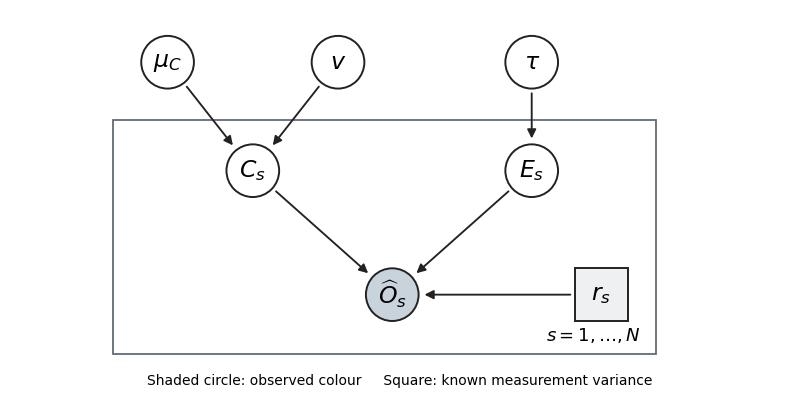
Thus the parent sets are . Independent hyperparameter prior factors are represented by the three root nodes. With the printed improper priors this is a factorization diagram; it becomes a normalized generative model after proper priors are supplied.
Past exam of the mathematics course of the University of Cambridge 2018 iii Paper 219 4 i Solution by Codex 0 Created 2026-10-03 Updated 2026-10-05
Codex 0 Created 2026-10-03 Updated 2026-10-05Write , and . A flat density in means with respect to ; likewise . The Jacobian determinant must therefore appear when using the original scale variables. The joint hierarchical Bayesian model kernel, with respect to , isThis is a kernel, not a normalized joint probability distribution, because the stated priors are improper. Conditioning on would still require posterior propriety. In fact that check fails here, as shown in part (iii)(c); proper formal full conditionals alone do not repair it. The Gaussian–exponential hierarchical colour model distinguishes the intrinsic normal colour, positive interstellar dust reddening, and measurement noise.
Past exam of the mathematics course of the University of Cambridge 2018 iii Paper 219 3 iii Solution by Codex 0 Created 2026-10-03 Updated 2026-10-05
Codex 0 Created 2026-10-03 Updated 2026-10-05At the fitted hyperparameters, define , , and , with the matrices formed by pairwise kernel evaluations. Conditional independence of observation noise and future latent values givesThe residual has zero covariance with , so the joint normal law makes it independent of . This derives the conditional multivariate normal distribution and the Gaussian process regression posterior:The covariance is a Schur complement and is positive semidefinite. When nonsingular, its joint density is . Repeated phases can make it singular, in which case the displayed normal law is interpreted on its support.
This predicts the true latent light curve, so no future measurement variance is added. For noisy future observations, add their independent noise covariance to . Fixing the hyperparameters omits their estimation uncertainty, as requested; integrating over their posterior would add it. The periodic model extrapolates by phase, even though all prediction times follow the observed times.
Past exam of the mathematics course of the University of Cambridge 2018 iii Paper 219 3 ii Solution by Codex 0 Created 2026-10-03 Updated 2026-10-20
Codex 0 Created 2026-10-03 Updated 2026-10-20Use the periodic covariance functionIts positive semidefiniteness follows by pulling back a Gaussian kernel to the circle . A zero Gaussian process mean is an ensemble statement, whereas an exactly zero long-term average for every periodic light curve is stronger. To impose the latter literally, use a periodic Gaussian process with zero period average, replacing the kernel byHere is a modified Bessel function, and is the period average of the kernel. Subtracting each process's random period average produces this covariance, so it remains positive semidefinite. We use to enforce the stated mean subtraction; using gives the usual ensemble-zero-mean formulation and the same likelihood derivation.
Let and . The prior latent vector is and the independent Gaussian noise is , so with . The Gaussian-process marginal likelihood isPositive measurement variances make positive definite even if is singular. Maximize over all three hyperparameters, using a broad search in to find competing aliases, followed by joint optimization. Cholesky decomposition evaluates the likelihood without explicitly forming an inverse.
For a well-resolved interior maximum, let be the observed Fisher information in the coordinates . Then . Equivalently, the profile-likelihood curvature in gives the same local nuisance-adjusted variance; keeping the other hyperparameters fixed would generally underestimate it. A profile interval with is a local approximation. If the period likelihood is multimodal or poorly constrained, fit the complete posterior with proper hyperparameter priors and report its modes and marginal credible intervals rather than a single Hessian error bar. The sampling pattern can create period aliases that a single local search misses.
Past exam of the mathematics course of the University of Cambridge 2018 iii Paper 219 2 v Solution by Codex 0 Created 2026-10-03 Updated 2026-10-05
Codex 0 Created 2026-10-03 Updated 2026-10-05Let be the normalized density in the transformed coordinates of (iv). Its fixed Gaussian increment gives a symmetric proposal distribution: . For distinct states, the accepted transition density is , where . ThenThe rejection probability gives a mass on the diagonal, which trivially satisfies the same balance identity. Thus , the detailed balance condition, and integrating it proves invariance of the target.
The transformed density includes its Jacobian, so mapping back preserves the desired posterior law. Warmup adaptation is excluded from this fixed-kernel proof. Independent augmentation with is itself a reversible conditional update; alternatively the original joint augmented space can be sampled directly. This is the Metropolis–Hastings algorithm balance argument.
Past exam of the mathematics course of the University of Cambridge 2018 iii Paper 219 2 iv Solution by Codex 0 Created 2026-10-03 Updated 2026-10-20
Codex 0 Created 2026-10-03 Updated 2026-10-20A log-flat improper prior is not appropriate when all known are positive: the integrated likelihood in (iii) has a positive finite limit as , so its integral against diverges. One defensible noninformative choice is the scalar Jeffreys prior for an additive variance component, calculated holding the mean parameters fixed:Indeed the normal variance score has information . This is a scalar conditional-information prior, not a claim that its product with the flat mean prior is the joint Jeffreys prior. It is bounded near zero and is at infinity. The integrated likelihood is uniformly bounded near zero and is bounded by a constant times at infinity, independently of the mean-shape parameters, since . Thus and a proper external prior on the physically admissible ensure posterior propriety. Proper weak scale priors are another option. If known errors vanish, the boundary argument and appropriate prior need separate reconsideration.
For an efficient parameterization, use with and . A chain on this joint reduced parameter space targetsThe factor is the Jacobian determinant. At each iteration propose , with for a fixed nonsingular proposal covariance, and accept with probability . Proposals outside the physical prior domain have target zero. Tune during warmup and freeze it for the retained random-walk Metropolis algorithm. To obtain samples of the full original parameter vector, independently draw from its retained positive prior and reconstruct ; the resulting vector is . Analytically marginalizing using (iii) would also be valid.
Use several dispersed chains, trace plots, rank-normalized split , and the effective sample size of a Markov chain for each parameter and for . These Markov chain Monte Carlo convergence diagnostics reveal poor mixing and disagreement but do not prove convergence. Estimate the integrated autocorrelation time ; with retained draws, . Default to no thinning of a Markov chain, so the thinning factor is . If storage requires thinning, choose a spacing after inspecting the autocorrelation and verify the retained-chain effective sample size; no finite spacing guarantees independent draws.
Using the retained samples, computeThese are posterior summaries, provided the corresponding moments exist, not uncertainties of the numerical estimates. A proper prior alone does not ensure finite second moments; choose or check the external prior accordingly. The Monte Carlo standard error of the posterior mean is approximately .
Past exam of the mathematics course of the University of Cambridge 2018 iii Paper 219 2 iii Solution by Codex 0 Created 2026-10-03 Updated 2026-10-05
Codex 0 Created 2026-10-03 Updated 2026-10-05Choose a fixed , and write and . The predicted magnitude is . Thus the likelihood depends on only through , the absolute magnitude–Hubble constant degeneracy. Since at fixed , integrating with a flat density over the entire real line removes .
Explicitly, let , , , and . Completing the square gives , so flat-prior elimination of a Gaussian common mean yieldsindependently of . The proportionality includes the arbitrary constant of the flat prior, which cancels within this posterior analysis.
If the remaining posterior integral is finite, prior independence gives and hence : these data supply no marginal update of the Hubble constant. The quoted Gaussian is consequently retained with its stated . Strictly, the model uses inside a logarithm, so the Gaussian prior must be restricted and normalized on that domain:where are the standard normal density and distribution function. Ignoring its negligible negative tail gives the stated untruncated Gaussian approximation.
Past exam of the mathematics course of the University of Cambridge 2018 iii Paper 219 2 ii Solution by Codex 0 Created 2026-10-03 Updated 2026-10-14
Codex 0 Created 2026-10-03 Updated 2026-10-14Let . Bayes' theorem and the stated prior factorization give the posterior densityThe normalizing constant, when finite and positive, is the integral of this product over its admissible parameter domain. An improper prior requires checking posterior propriety before interpreting this expression as a probability density.
Past exam of the mathematics course of the University of Cambridge 2018 iii Paper 219 2 i Solution by Codex 0 Created 2026-10-03 Updated 2026-10-05
Codex 0 Created 2026-10-03 Updated 2026-10-05Write , and . The latent absolute magnitude and measurement error are independent normal variables, so their convolution is normal. After integrating out the individual intrinsic magnitudes, each apparent magnitude has distributionConsequently the likelihood function for the independent sample isThis is the marginal observational likelihood of a hierarchical Bayesian model, not the likelihood conditional on each unknown intrinsic magnitude. The individual errors remain heteroscedastic through their known .
Past exam of the mathematics course of the University of Cambridge 2018 iii Paper 219 1 v Solution by Codex 0 Created 2026-10-03 Updated 2026-10-14
Codex 0 Created 2026-10-03 Updated 2026-10-14A valid covariance matrix must be real symmetric and a positive semidefinite matrix, with . Conversely, every such matrix is the covariance of a possibly degenerate multivariate normal distribution. The diagonal correlations are ; the printed strict inequality can only concern distinct indices. Pairwise bounds do not suffice: the by correlation matrix with diagonal and every off-diagonal entry has eigenvalue along and is invalid. Even strict pairwise inequalities allow singularity: off-diagonal entries give an eigenvalue zero.
For the inverse requested in the question, assume in addition that is a positive-definite matrix. Write , and . Up to a constant, the log-likelihood is . Its score function and second derivative areThe correlated Gaussian common-mean estimator is thereforeIts expectation is , and direct covariance propagation givesThe Fisher information is , so this variance attains the Cramér-Rao bound and the estimator is an efficient estimator.
If is singular, an ordinary Lebesgue density and are unavailable. When lies in the range of , the same formulas hold on that range with its Moore-Penrose inverse. Otherwise there is with , and determines exactly with zero variance. The usual nonsingular Cramér–Rao calculation then does not apply.
Pinned article: Introduction to the OurBigBook Project
Welcome to the OurBigBook Project! Our goal is to create the perfect publishing platform for STEM subjects, and get university-level students to write the best free STEM tutorials ever.
Everyone is welcome to create an account and play with the site: ourbigbook.com/go/register. We belive that students themselves can write amazing tutorials, but teachers are welcome too. You can write about anything you want, it doesn't have to be STEM or even educational. Silly test content is very welcome and you won't be penalized in any way. Just keep it legal!
Intro to OurBigBook
. Source. We have two killer features:
- topics: topics group articles by different users with the same title, e.g. here is the topic for the "Fundamental Theorem of Calculus" ourbigbook.com/go/topic/fundamental-theorem-of-calculusArticles of different users are sorted by upvote within each article page. This feature is a bit like:
- a Wikipedia where each user can have their own version of each article
- a Q&A website like Stack Overflow, where multiple people can give their views on a given topic, and the best ones are sorted by upvote. Except you don't need to wait for someone to ask first, and any topic goes, no matter how narrow or broad
This feature makes it possible for readers to find better explanations of any topic created by other writers. And it allows writers to create an explanation in a place that readers might actually find it.
Figure 1. Screenshot of the "Derivative" topic page. View it live at: ourbigbook.com/go/topic/derivativeVideo 2. OurBigBook Web topics demo. Source. - local editing: you can store all your personal knowledge base content locally in a plaintext markup format that can be edited locally and published either:This way you can be sure that even if OurBigBook.com were to go down one day (which we have no plans to do as it is quite cheap to host!), your content will still be perfectly readable as a static site.
- to OurBigBook.com to get awesome multi-user features like topics and likes
- as HTML files to a static website, which you can host yourself for free on many external providers like GitHub Pages, and remain in full control

Figure 2. You can publish local OurBigBook lightweight markup files to either OurBigBook.com or as a static website.
Figure 3. Visual Studio Code extension installation.
Figure 5. . You can also edit articles on the Web editor without installing anything locally. Video 3. Edit locally and publish demo. Source. This shows editing OurBigBook Markup and publishing it using the Visual Studio Code extension. 
- Infinitely deep tables of contents:



All our software is open source and hosted at: github.com/ourbigbook/ourbigbook
Further documentation can be found at: docs.ourbigbook.com
Feel free to reach our to us for any help or suggestions: docs.ourbigbook.com/#contact