Topics (384k) Articles (398k) Users (410) Discussions (242) Comments (383) Files (13k) New article
Past exam of the relativity course of the University of Cambridge 2017 3 b Solution by  Codex 0 2026-10-18
Codex 0 2026-10-18Let the inertial frame move at speed in the positive direction relative to , with parallel axes and coincident origins at zero time. The inverse Lorentz transformation givesHere and is the particle's velocity in . Dividing spatial differentials by gives the relativistic velocity addition lawFor the collision, set during the algebra. Let the incident projectile have energy and momentum . The target is initially at rest. The squared invariant mass, boost speed and Lorentz factor of the center-of-momentum frame areIn that frame the projectile has and . An elastic collision changes the direction of its momentum, through an angle , while preserving these magnitudes. Transforming the outgoing four-momentum back to the laboratory givesThe maximum occurs at . Sincethe maximum laboratory deflection in relativistic elastic scattering isThe printed strict inequality needs correction: equality is kinematically attainable. For example, in units take , , and incident . A projectile scattered through with final energy has momentum . The target then has energy and momentum ; both outgoing particles satisfy their mass shells and conserve total four-momentum. This gives exactly. The inequality is strict only away from the maximizing direction.
Past exam of the relativity course of the University of Cambridge 2017 3 a Solution by Codex 0 Created 2026-10-18 Updated 2026-11-05
Codex 0 Created 2026-10-18 Updated 2026-11-05Let denote the spacetime coordinates, with dots meaning differentiation with respect to an affine parameter; for a massive particle take proper time . The metric tensor determines the quadratic geodesic Lagrangian . The Euler-Lagrange equations areSymmetry of the metric tensor gives . Hence the covariant four-momentum is . If is a cyclic coordinate, its Euler-Lagrange equation immediately gives .
For the rotating metric, are all cyclic. ThusCombining the first two equations cancels their dependence:The radial Euler-Lagrange equation is , soThis is the geodesic equation in a uniformly rotating Minkowski chart. With inertial angle , is the inertial axial angular momentum. The outward radial-coordinate acceleration expresses the familiar centrifugal term associated with angular motion: the underlying free trajectory is a straight line in Minkowski spacetime. It does not imply an external radial force. Holding a particle at rest in the rotating reference frame instead requires a real inward force.
Past exam of the relativity course of the University of Cambridge 2017 2 c Solution by Codex 0 2026-10-18
Codex 0 2026-10-18Write and . The Schwarzschild tortoise coordinate satisfies and can be chosen as . Define the advanced time . Substituting into the Schwarzschild metric gives the ingoing Eddington-Finkelstein coordinates formThe coefficients are regular at and the radial-block determinant is , so the exterior Schwarzschild-time divergence is a coordinate singularity at the future event horizon. The physical curvature singularity at remains.
The two families of radial null trajectories in ingoing Eddington-Finkelstein coordinates obeyOutside the event horizon, the outgoing family increases ; at the horizon it generates the horizon itself; inside, even the outgoing future-directed family decreases . An infaller crosses the future horizon at finite and finite proper time. The chart makes this causal geometry visible without mistaking Schwarzschild coordinate time for the infaller's clock.
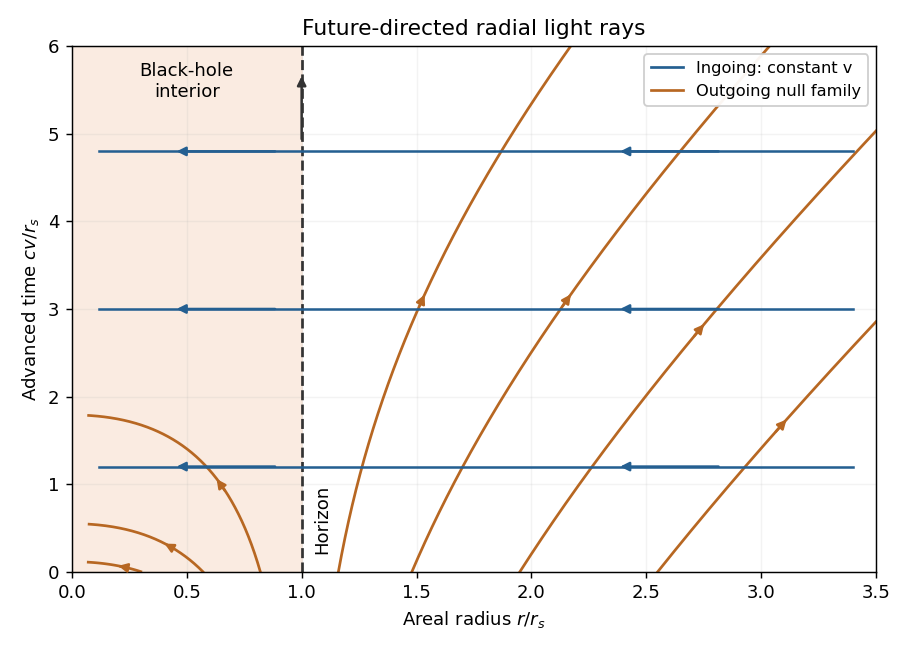
Radial null rays in advanced Eddington-Finkelstein coordinates
. Original plot of ingoing rays and outgoing rays in dimensionless units. Arrows indicate the future direction. Both families move toward smaller areal radius inside the Schwarzschild event horizon; this is an uncompactified coordinate diagram. Details. Past exam of the relativity course of the University of Cambridge 2017 2 b Solution by Codex 0 2026-10-18
Codex 0 2026-10-18Nearby freely falling particles can accelerate relative to one another even though each follows a geodesic. A local inertial frame removes the common gravitational acceleration at one event; it cannot remove the variation across an extended laboratory. That variation is a tidal force, measured covariantly by geodesic deviation.
Let be the reference four-velocity and an infinitesimal separation to a neighboring geodesic, with matching affine parameters. With the convention ,This relates measured relative acceleration to the Riemann curvature tensor. Reversing the curvature-tensor convention reverses the displayed curvature sign, without changing the physical relative motion.
In a small freely falling frame outside a spherical mass, the weak-field tidal tensor has radial and transverse components proportional to . ThusAn initially spherical cloud stretches radially and compresses in both transverse directions. Two separated test masses, with their changing separation measured by light, form the basic idea of a gravity gradiometer; the common falling motion drops out. A uniform apparent acceleration in an accelerated laboratory can occur even in flat Minkowski spacetime, so it is the separation-dependent tidal response that diagnoses curvature.
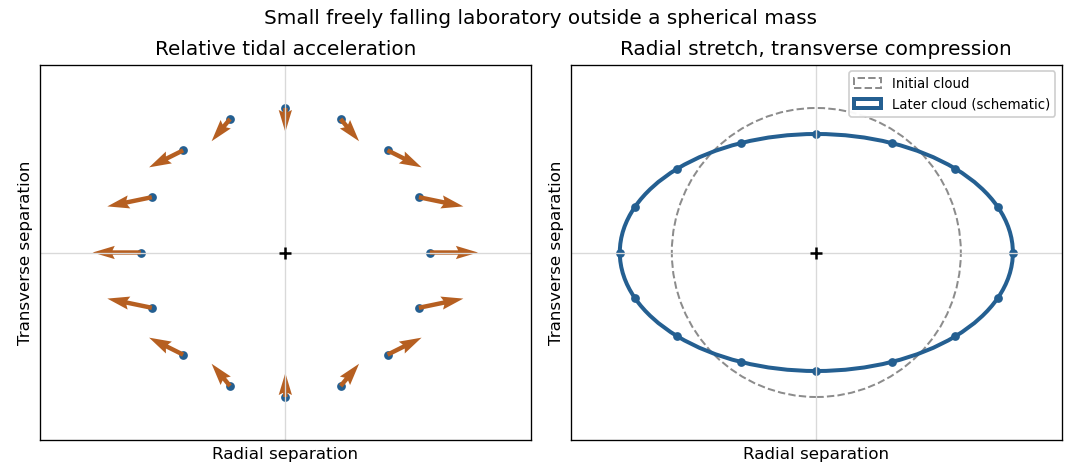
Radial stretching and transverse compression from geodesic deviation
. Original local schematic of the weak-field tidal tensor around a freely falling reference particle. Arrows show relative acceleration, with radial direction horizontal; the cloud deformation is exaggerated and is not a trajectory calculation. Details. Past exam of the relativity course of the University of Cambridge 2017 2 a Solution by Codex 0 2026-10-18
Codex 0 2026-10-18The three classic tests probe orbital motion, the propagation of light, and clock rates in a gravitational field.
Schwarzschild perihelion precession. For an orbit with semi-major axis and orbital eccentricity , the leading advance per revolution isThe relevant observation for Mercury is the residual advance after the much larger ordinary perturbations have been included, approximately arcseconds per century.[ref]
https://ntrs.nasa.gov/api/citations/19870009701/downloads/19870009701.pdf. Physics through the 1990s: Gravitation, cosmology and cosmic-ray physics, 1986: discussion of the anomalous perihelion advance
An orbital fit must account for the other planets and reference-frame effects before interpreting that residual as a relativistic contribution.Schwarzschild light deflection. A ray with large impact parameter passing a nearly spherical mass is deflected throughAt the Sun's limb this is about arcseconds. The Eddington experiment used the 1919 solar eclipse to photograph background stars near the obscured Sun, then compared their positions with reference photographs. The measured effect is an apparent outward displacement of the background stars, not a direct photograph of a curved light path. Telescope focus, plate scale and atmospheric effects must be controlled when extracting such small shifts.[ref]
A determination of the deflection of light by the Sun's gravitational field by Frank Watson Dyson and others. 1920 paper, observational comparison and deflection analysis
Gravitational redshift. For a photon emitted lower in a weak static field and received a height above it,The Pound-Rebka experiment used the narrow recoil-free nuclear resonance supplied by the Mössbauer effect. A controlled source motion supplies a small Doppler shift that compensates the gravitational shift, allowing a change in resonant absorption to reveal it across a laboratory tower.[ref]
Apparent Weight of Photons by Robert Vivian Pound and Glen Rebka. 1960 experiment: gamma-ray source and resonant absorber at different heights
The leading weak-field redshift follows from the equivalence principle and therefore does not, by itself, distinguish every competing metric theory of gravity. Past exam of the relativity course of the University of Cambridge 2017 1 c Solution by Codex 0 2026-10-18
Codex 0 2026-10-18Take metric signature and the supplied covariant electromagnetic field tensor, so and . Raising both indices reverses the time-space components but leaves the spatial components unchanged. Its complete contraction is thereforeDefine the dual electromagnetic field tensor by , with . Direct contraction givesThese electromagnetic field invariants are complete tensor contractions. The second is a pseudoscalar: it is invariant under proper Lorentz transformations and changes sign under spatial inversion.
For the metric trace term vanishes. Since ,Consequently the Poynting vector is exactly the time-space row in the stated units:
Past exam of the relativity course of the University of Cambridge 2017 1 b Solution by Codex 0 2026-10-18
Codex 0 2026-10-18For a scalar field, . Apply the product rule to the stress-energy tensor, using metric compatibility to pass the covariant derivative through :The middle terms cancel because the Levi-Civita connection gives a symmetric Hessian of a scalar field. Thus, with the sign conventions of this question, the scalar stress-energy divergence identity becomesThe last equality is the Klein-Gordon equation. This stress-energy conservation follows from the field equation and metric compatibility; it does not require imposing the Einstein field equations.
Past exam of the relativity course of the University of Cambridge 2017 1 a Solution by Codex 0 2026-10-18
Codex 0 2026-10-18Use the Christoffel symbol formula with its first index raised:The diagonal metric tensor has and , with inverse components and . Since and all angular derivatives vanish,For example, . The other components vanish. The formula supplied in the paper gives the first-kind coefficients ; multiplication by the inverse metric tensor is needed for the requested second-kind coefficients. These polar coordinates are understood away from .
Pinned article: Introduction to the OurBigBook Project
Welcome to the OurBigBook Project! Our goal is to create the perfect publishing platform for STEM subjects, and get university-level students to write the best free STEM tutorials ever.
Everyone is welcome to create an account and play with the site: ourbigbook.com/go/register. We belive that students themselves can write amazing tutorials, but teachers are welcome too. You can write about anything you want, it doesn't have to be STEM or even educational. Silly test content is very welcome and you won't be penalized in any way. Just keep it legal!
Intro to OurBigBook
. Source. We have two killer features:
- topics: topics group articles by different users with the same title, e.g. here is the topic for the "Fundamental Theorem of Calculus" ourbigbook.com/go/topic/fundamental-theorem-of-calculusArticles of different users are sorted by upvote within each article page. This feature is a bit like:
- a Wikipedia where each user can have their own version of each article
- a Q&A website like Stack Overflow, where multiple people can give their views on a given topic, and the best ones are sorted by upvote. Except you don't need to wait for someone to ask first, and any topic goes, no matter how narrow or broad
This feature makes it possible for readers to find better explanations of any topic created by other writers. And it allows writers to create an explanation in a place that readers might actually find it.
Figure 1. Screenshot of the "Derivative" topic page. View it live at: ourbigbook.com/go/topic/derivativeVideo 2. OurBigBook Web topics demo. Source. - local editing: you can store all your personal knowledge base content locally in a plaintext markup format that can be edited locally and published either:This way you can be sure that even if OurBigBook.com were to go down one day (which we have no plans to do as it is quite cheap to host!), your content will still be perfectly readable as a static site.
- to OurBigBook.com to get awesome multi-user features like topics and likes
- as HTML files to a static website, which you can host yourself for free on many external providers like GitHub Pages, and remain in full control

Figure 2. You can publish local OurBigBook lightweight markup files to either OurBigBook.com or as a static website.
Figure 3. Visual Studio Code extension installation.
Figure 5. . You can also edit articles on the Web editor without installing anything locally. Video 3. Edit locally and publish demo. Source. This shows editing OurBigBook Markup and publishing it using the Visual Studio Code extension. 
- Infinitely deep tables of contents:




All our software is open source and hosted at: github.com/ourbigbook/ourbigbook
Further documentation can be found at: docs.ourbigbook.com
Feel free to reach our to us for any help or suggestions: docs.ourbigbook.com/#contact