Topics (384k) Articles (398k) Users (410) Discussions (242) Comments (383) Files (13k) New article

For a singly charged track perpendicular to a uniform magnetic field, its curvature gives magnetic rigidity , and the bend direction gives the sign of electric charge. The mass shell relation and four-momentum relation between energy and velocity giveFor a known path length and constant velocity, time of flight therefore givesThis measures rest mass under an assigned electric charge magnitude. Curvature alone measures , so independent evidence for matters. In material, the measured delay is instead ; matching a local Cherenkov detector velocity to an upstream momentum requires an energy-loss correction.
As an original illustrative calculation, choose and , with rounded input rest energies and . Constant-velocity propagation givesBoth particles have the same selected momentum and negative electric charge, yet their time of flight separation is about . These are calculated values for a deliberately simplified example, not measured discovery events.
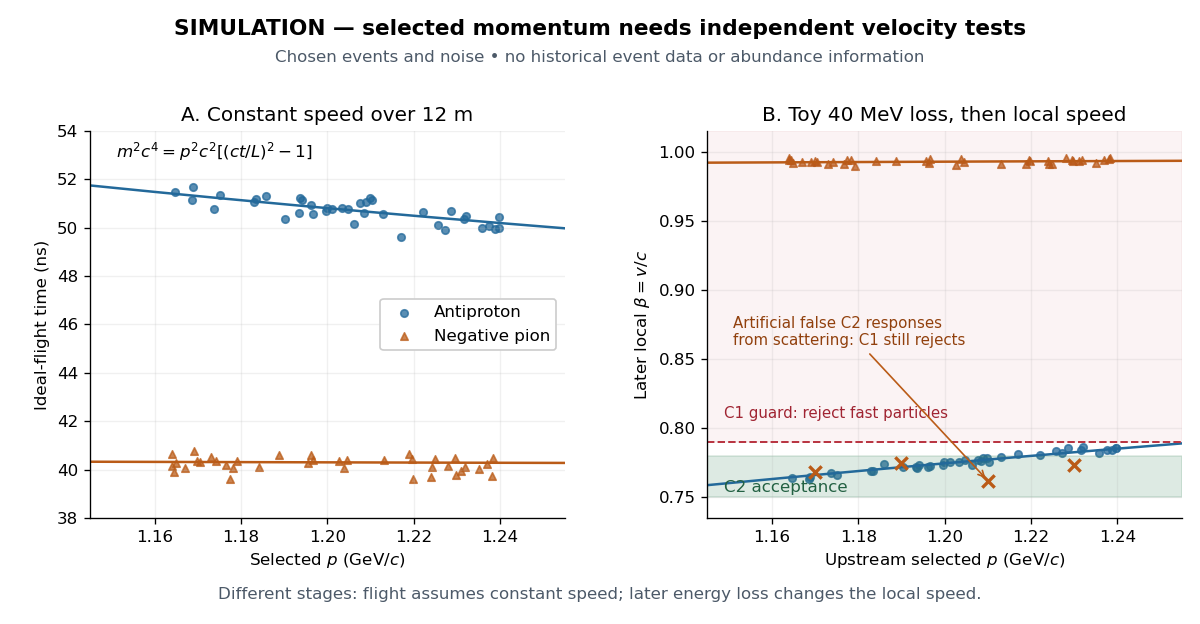
For example, the toy energy loss changes the central antiproton velocity from to . Directly substituting the slower downstream value together with the upstream momentum would overestimate the rest mass. The two panels thus describe different stages of a deliberately specified model; their numerical consistency depends on propagating energy between stages. Likewise, the scattered-pion markers represent an erroneous C2 response, not actual slow pions; an upstream C1 signal still rejects them.
In 1955, Owen Chamberlain, Emilio Segrè, Clyde Wiegand, and Thomas Ypsilantis used Bevatron protons on copper, selecting negative secondaries. Magnetic fields selected ; scintillation counters S1 and S2 measured time of flight over . Cherenkov detector C1 flagged ; C2 accepted after material losses. S3 checked traversal. The cuts rejected negative pions.[ref]
Chamberlain's 1959 account describes C2's quartz radiator, mirrors, and photomultiplier readout. The trigger combined delayed scintillation counter signals with C2; photographed oscilloscope traces exposed fast particles and accidental coincidences through C1 pulses or extra pulses. Reversing the magnetic fields provided a positive-proton control and revealed an alignment error. Changing selected momentum at fixed velocity acceptance tested for a proton-mass peak.[ref]
The early antiproton work by Owen Chamberlain. 1959 lecture, pp. 496–501, Figs. 7–11; Columbia scan
Terminal-event studies remained unfinished; the 1955 identification did not rely on annihilation.[ref]
https://escholarship.org/content/qt46p0z8w7/qt46p0z8w7.pdf. UCRL-3172, p. 13
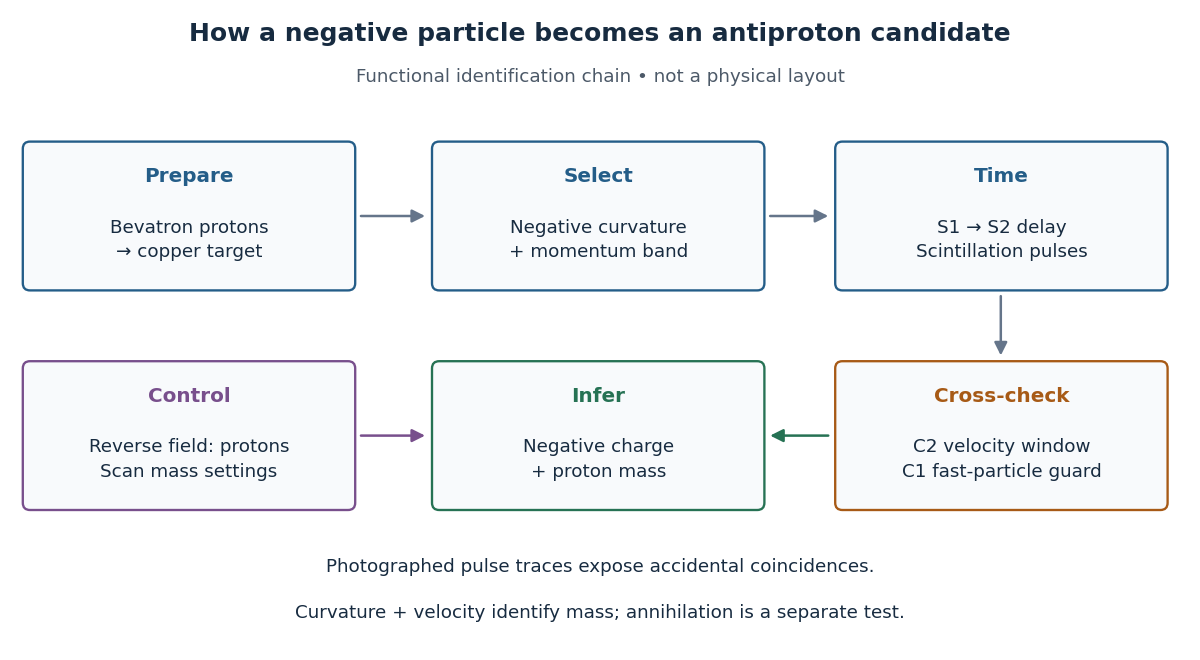
The logic is useful far beyond this experiment. A magnetic field separates electric charge signs and magnetic rigidity, but particles of different rest masses can share both. A time of flight signal adds velocity, while a Cherenkov detector independently checks whether that velocity is plausible. An accidental coincidence can imitate the delay of a slow particle without being one particle traversing the apparatus. Agreement between independent measurements is therefore part of the inference, rather than a redundant decoration.
The antineutrino associated with the electron flavour of the weak charged current. It has zero electric charge and lepton number in the usual production-and-detection description.
The antineutrino associated with the muon flavour of the weak charged current has zero electric charge and lepton number in the usual production-and-detection description. A negative muon decays to an electron, an electron antineutrino and a muon neutrino; the charge-conjugate process instead produces the muon antineutrino.
For complex invertible matrices , implies and . Invariance of matrix trace under matrix similarity gives both zero traces. Invariance of determinant gives , and invertibility forces even. Equivalently, eigenvalues occur in pairs with equal algebraic multiplicity, and zero is excluded. Both invertibility assumptions matter: and anticommute in dimension three but are singular and have nonzero traces.
Electron-positron annihilation converts an electron and a Positron into other particles while conserving total energy, momentum and electric charge. A common low-energy channel produces two photons. In the centre-of-momentum frame, negligible initial kinetic energy gives two oppositely directed photons, each with energy .
The back-to-back momentum balance makes paired photon detections a useful signature of annihilation. Motion of the initial pair changes the laboratory photon directions and energies. At larger collision energy, other final states become accessible: an intermediate virtual photon can produce, for example, a muon-antimuon pair. Thus annihilation converts the initial pair into allowed final excitations rather than destroying conserved energy.
A finite rod generally contains both exponential branches. With prescribed oscillating temperature at and an insulated far end, , the exact solution isThe correction near a sensor is controlled by . The important separation is between the farther sensor and the end, not merely between the heater and the end. For a far end clamped at the mean temperature, , replace both hyperbolic cosines by hyperbolic sines; other end boundary conditions require their corresponding solution.
In the lossy Ångström method worked example, an insulated rod of length gives and . Incorrectly applying the semi-infinite formula returns , about high. At , it returns , about low. Side loss remains real in both cases; the error arises because the measured spatial response no longer has one exponential complex wavenumber.
Choose the period and sensor spacing so that the lag and attenuation are resolvable while the downstream signal remains larger than sensor noise. Keep transverse equilibration fast compared with the period; compare the transverse thermal diffusion time with and check that surface exchange does not create large transverse temperature gradients. A short period reduces far-end influence but can expose sensor response times; a long period increases penetration and finite-end bias. Calibrate both sensors together, exchange their positions to check channel bias, compare successive cycles, and repeat at several spacings and periods. In a valid single-exponential region, linear regression of against and unwrapped lag against should give consistent slopes. These are proposed diagnostic controls. If they fail, fit the finite-rod or coupled-sensor model rather than interpreting every delay as intrinsic thermal diffusivity.
Consider an original stipulated model, not measured material data: thermal diffusivity , period , driven temperature amplitude , and thermometers at and . Without side losses, and thermal penetration depth . ThusThe two no-loss estimates and the combined estimate all return .
Now retain the same thermal diffusivity and drive but introduce . The exact complex wavenumber gives and , henceUsing attenuation alone with the no-loss formula would give ; using lag alone would give . Their disagreement is informative. If an independent volumetric heat capacity measurement gives , the combined estimate implies thermal conductivity and .
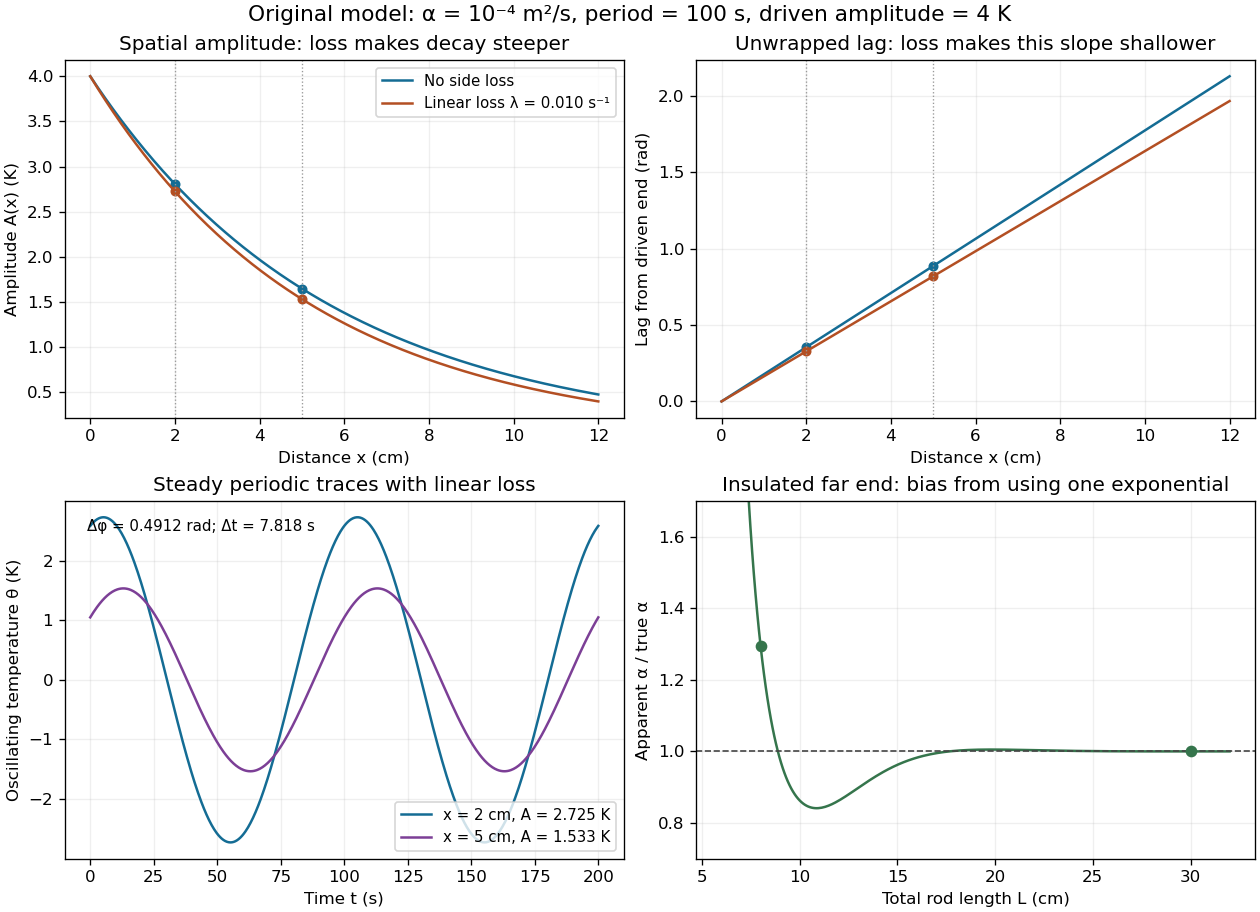
The exact complex amplitudes can be checked independently by discretizing and solving the resulting linear system with a tridiagonal matrix. Halving the spatial step quarters the discrepancy, as expected for centered finite differences. Separately fitting the real time traces to a constant plus sine and cosine terms recovers both amplitudes and their lag; this also checks the sign convention used in the combined estimate.
Side losses need not destroy the method. Let be the small temperature disturbance about a steady background in surroundings at fixed temperature. For a rod of cross-sectional area and perimeter , a uniform real surface heat transfer coefficient produces a loss per unit volume of , with . Assume constant , a cross-section nearly uniform in temperature, and no distributed heat source. The balance becomesHere has units , while has units . This is a distributed version of Newton's law of cooling; a constant linearized contribution from thermal radiation may be included over a small temperature range. It does not represent arbitrary time-dependent coupling to a surrounding material with its own thermal storage.
For the decaying exponential branch, the phasor equation givesso thatReal positive side loss increases and decreases at fixed angular frequency and thermal diffusivity. Their product eliminates , yielding the combined inferenceThis result requires that attenuation and lag belong to the same exponential complex wavenumber at the same frequency, and that the loss term is real. It does not generally survive a superposition caused by a nearby finite end, spatially varying coefficients, transverse temperature gradients, or unequal sensor delays. The inferred supplies an additional model check; a negative value signals inconsistency with this passive-loss model rather than negative physical cooling.
A thermal diffusion wave is a periodically forced solution of the heat equation, with spatially decreasing amplitude and varying wave phase. In a semi-infinite rod , assume constant thermal diffusivity, negligible side losses, a nearly uniform temperature across each cross-section, and the boundary conditions and as . A steady periodic thermal state then satisfiesChoose the square root in the complex numbers with so that the amplitude decays into the rod. Substitution of the phasor into the heat equation proves the formula: . Taking the real part gives the displayed cosine. In this convention is the spatial attenuation slope and is the spatial lag slope, both in ; combines them into one complex number. If a complex wavenumber is defined by instead, .
With , let and define a positive downstream lag . Thenand either measurement determines thermal diffusivity:The logarithm uses an amplitude ratio, not a ratio of squared amplitudes. The lag is in radians and must be tracked continuously across cycles: a measured phase difference modulo leaves an integer-cycle ambiguity. Use closer sensor spacings or vary frequency continuously to resolve that ambiguity. Equal attenuation and lag slopes provide a useful diagnostic of the no-side-loss model.
The apparent phase velocity is , which depends on frequency. A thermal diffusion wave therefore does not give a material-independent travel speed for heat; it is a forced pattern in a dissipative diffusion equation. The ideal heat equation still has infinite propagation speed, and the observed lag is not the arrival time of a sharp front.
A steady periodic thermal state repeats each drive period after the startup transient has decayed. It is time dependent, unlike a time-independent steady state. For angular frequency , its single-frequency part has the phasor representation . Here is the oscillating temperature about the mean profile. Repeating the fitted amplitudes and wave phases over successive cycles checks that startup drift is small; merely completing one drive cycle is insufficient.
Stig Lundquist, the author printed as S. Lundquist, reported an early laboratory test in 1949. The apparatus used mercury in a stainless-steel cylinder, a vibrating disk, and a floating mirror to indicate the motion at the liquid surface. The reproduced apparatus drawing also shows a scale; the accompanying account gives an applied magnetic field of .[ref]
Numerical investigations of rotating MHD in a spherical shell by Andrey Sheyko. Andrey Sheyko, Numerical investigations of rotating MHD in a spherical shell (2014), p. 8, Figure 1.4 and following paragraph; reproduction of Lundquist's apparatus
The imposed magnetic field ran along the cylinder, while the bottom disk oscillated to excite azimuthal motion. Varying the drive frequency sought a standing wave resonance. A later authored experimental account describes this as an early hint: the resonance peak was not reached, and magnetic damping was substantial.[ref]
Torsional Alfvén waves in a dipolar magnetic field: experiments and simulations by Z. Tigrine and others. 2019, Section 1, paragraph beginning “Only a few laboratory experiments”: mercury vessel, bottom crenelated disk, resonance search and unreached peak
The experiment therefore tested a bounded azimuthal shear disturbance, related to a torsional Alfvén wave, rather than an infinite plane wave or a compression-driven magnetosonic wave.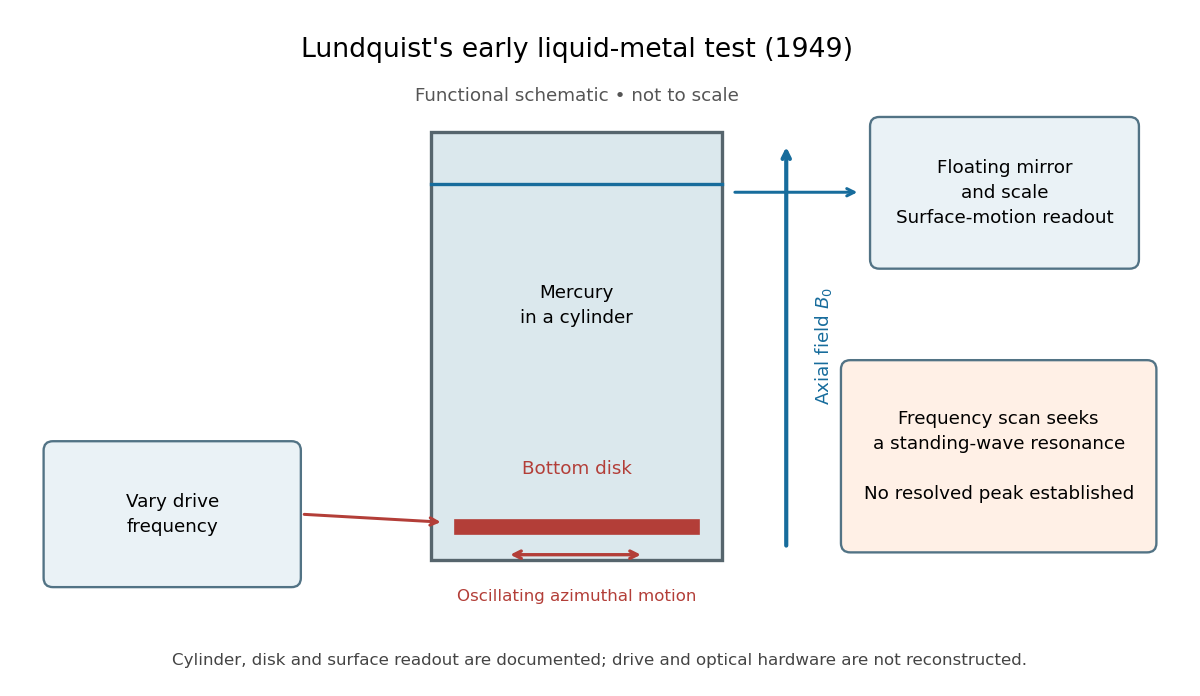
The magnetic field provides the controlled physical parameter: the ideal Alfvén wave prediction makes a propagation speed proportional to its strength, while a resonance also depends on the vessel's boundary conditions. A quantitative test must compare the driven response with finite-electrical conductivity theory and account for mechanical coupling and wall losses. An observed surface motion alone cannot distinguish all these mechanisms. The reproduced apparatus account gives neither a numerical drive frequency nor a field-off comparison. Lundquist's paper itself calls the experiment preliminary and proposes further investigations.[ref]
Experimental Investigations of Magneto-Hydrodynamic Waves by Stig Lundquist. Abstract, final sentence: preliminary experiment and proposed investigations
Finite electrical conductivity allows magnetic diffusion, with magnetic diffusivity . In the same uniform, unbounded geometry as the Linear Alfvén wave equations, neglect viscosity but add to induction. For real and time dependence , elimination givesThus weak magnetic diffusion, , gives an amplitude decay rate . For , both temporal roots are purely decaying; they no longer describe an oscillating traveling mode. This temporal calculation at fixed real wavenumber is different from a driven vessel at fixed real frequency, where a complex spatial wavenumber describes penetration and attenuation. Viscosity also dissipates kinetic energy, and walls introduce transverse gradients and additional losses.
For an axial length , comparing the magnetic diffusion time with the transit time gives the ratio . A large value favors propagation before diffusion, but a narrow vessel can introduce a shorter transverse diffusion scale. In the actual 1949 analysis, finite electrical conductivity and vessel dimensions restrict the useful frequency interval; above its upper limit the response becomes a skin wave.[ref]
Experimental Investigations of Magneto-Hydrodynamic Waves by Stig Lundquist. Abstract: finite-conductivity frequency interval, upper limit and geometrical lower limit
Dot the two Linear Alfvén wave equations with and , respectively, and add. The result is conservation of energy withA single traveling Alfvén wave has equal kinetic energy and perturbation magnetic energy, and . This equality need not hold instantaneously at each point of a superposed standing wave.
As an original ideal-model example, stipulate , and a uniform path . Using , the Alfvén speed is and the transit time is . Doubling the magnetic field halves that time. A sinusoidal velocity with peak amplitude has magnetic peak amplitude and mean energy flux in the positive direction. These are stipulated ideal parameters, not historical measurements or a prediction including vessel walls.
Take a static uniform fluid of mass density , constant gas pressure, and background magnetic field with . Use SI units, vacuum permeability , zero electrical resistivity and zero viscosity. Write and , with both disturbances perpendicular to . Retain only linear order in their amplitudes. There is no background fluid flow, so the linear material derivative is .
The continuity equation has , hence ; choosing no initial mass density fluctuation gives . For this shear mode the gas pressure fluctuation is also zero. In the ideal magnetohydrodynamic momentum equation, the Lorentz force density can be writtenBecause , the perturbed magnetic pressure starts at quadratic order. The surviving transverse magnetic tension gives the first equation below. Expanding the ideal magnetohydrodynamic induction equation gives the second:Differentiate the first in time and substitute the second. Both velocity and magnetic field disturbances obey the one-dimensional wave equation:For a plane wave proportional to , this gives , or . The magnetic and velocity amplitudes satisfy : they have opposite signs for propagation along and equal signs for propagation along . The general uniform-background shear polarization of waves, perpendicular to both and , gives the same dispersion relation with . Its group velocity is , whereas its phase velocity normal to an oblique wavefront has magnitude .
U. Essmann and H. Träuble reported triangular vortex arrays, including defects, using electron microscopy on lead-indium and niobium samples in the remanent state.[ref]
The direct observation of individual flux lines in type II superconductors by U. Essmann and H. Träuble. Publisher abstract, materials, electron microscopy and remanent-state lattices
Such a prepared state need not display the equilibrium array at a uniform applied field. Images of regular positions and a proof of unrestricted vortex motion would answer different questions.A measure of spatial nonuniformity in the order parameter, with averages taken over one lattice cell. Set . ThenEquality requires uniform , so a nonconstant core pattern costs more in the quartic term than a uniform amplitude with the same mean squared amplitude. This identity alone does not compare two different vortex arrays: their admissible profiles must also satisfy the field equations.
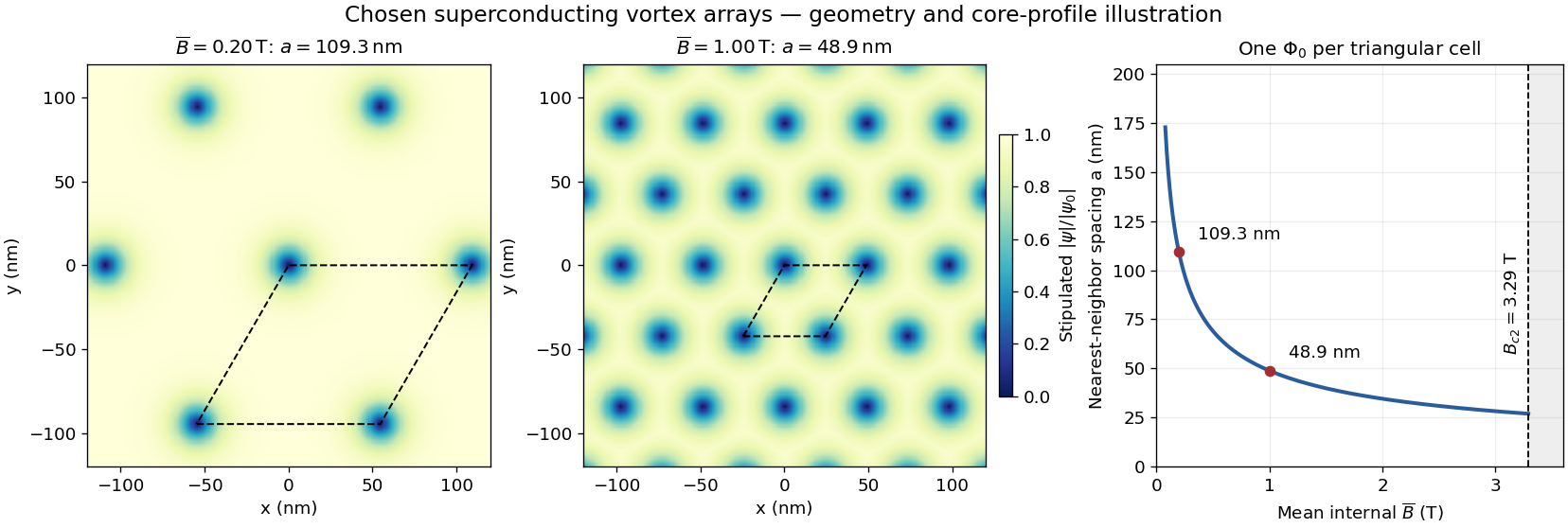
Assume a triangular array of straight, singly quantized Abrikosov vortices with nearest-neighbor distance . Here is the magnitude of the spatially averaged internal magnetic field, and is the superconducting flux quantum; is the elementary charge. Two lattice vectors of length meeting at span area . One flux quantum per cell givesThus multiplying by five decreases by ; it does not multiply the flux of each vortex by five. Using the exact SI Planck constant and elementary charge, .[ref]
For chosen internal fields and , the spacings are approximately and . These are geometric model calculations, not measurements from a particular sample. The local magnetic field varies within a cell; replacing by the field at a core would not give this counting relation.
At leading order, for final fermions much lighter than the Z boson, the partial decay width is proportional to . Here is the final-state color multiplicity in a decay width, and , are the dimensionless left- and right-chirality couplings. The common normalization cancels in ratios.
Pinned article: Introduction to the OurBigBook Project
Welcome to the OurBigBook Project! Our goal is to create the perfect publishing platform for STEM subjects, and get university-level students to write the best free STEM tutorials ever.
Everyone is welcome to create an account and play with the site: ourbigbook.com/go/register. We belive that students themselves can write amazing tutorials, but teachers are welcome too. You can write about anything you want, it doesn't have to be STEM or even educational. Silly test content is very welcome and you won't be penalized in any way. Just keep it legal!
Intro to OurBigBook
. Source. We have two killer features:
- topics: topics group articles by different users with the same title, e.g. here is the topic for the "Fundamental Theorem of Calculus" ourbigbook.com/go/topic/fundamental-theorem-of-calculusArticles of different users are sorted by upvote within each article page. This feature is a bit like:
- a Wikipedia where each user can have their own version of each article
- a Q&A website like Stack Overflow, where multiple people can give their views on a given topic, and the best ones are sorted by upvote. Except you don't need to wait for someone to ask first, and any topic goes, no matter how narrow or broad
This feature makes it possible for readers to find better explanations of any topic created by other writers. And it allows writers to create an explanation in a place that readers might actually find it.
Figure 1. Screenshot of the "Derivative" topic page. View it live at: ourbigbook.com/go/topic/derivativeVideo 2. OurBigBook Web topics demo. Source. - local editing: you can store all your personal knowledge base content locally in a plaintext markup format that can be edited locally and published either:This way you can be sure that even if OurBigBook.com were to go down one day (which we have no plans to do as it is quite cheap to host!), your content will still be perfectly readable as a static site.
- to OurBigBook.com to get awesome multi-user features like topics and likes
- as HTML files to a static website, which you can host yourself for free on many external providers like GitHub Pages, and remain in full control

Figure 2. You can publish local OurBigBook lightweight markup files to either OurBigBook.com or as a static website.
Figure 3. Visual Studio Code extension installation.
Figure 5. . You can also edit articles on the Web editor without installing anything locally. Video 3. Edit locally and publish demo. Source. This shows editing OurBigBook Markup and publishing it using the Visual Studio Code extension. 
- Infinitely deep tables of contents:




All our software is open source and hosted at: github.com/ourbigbook/ourbigbook
Further documentation can be found at: docs.ourbigbook.com
Feel free to reach our to us for any help or suggestions: docs.ourbigbook.com/#contact