Topics (349k) Articles (361k) Users (410) Discussions (238) Comments (383) Files (12k) New article
For fractional Brownian motion, controls the variance of increments and the scaling of its finite-dimensional distributions. Larger means smaller increment variance on intervals shorter than one and greater sample-path Hölder continuity.
For independent coordinate flips at rate , a Walsh character is an eigenfunction with eigenvalue . The generator is self-adjoint and negative semidefinite. Its Dirichlet form of a Markov chain is .
The Fourier transform on a finite group convention has the displayed inversion formula. The sum is over one representative from each equivalence class of unitary irreducible representations. It follows from the Schur orthogonality relations and the regular representation decomposition, and holds at every group element without a limiting argument.
For the Fourier transform on a finite group, the displayed identity uses uniform expectation in the original function space and a weighted Hilbert-Schmidt inner product in the matrix components. In particular . For an abelian group, all , and the identity becomes a sum of squared scalar coefficients.
For an orthogonal matrix , a unit-Jacobian change of variables gives . The dual definition of the Fourier transform of a tempered distribution consequently givesSince the Fourier transform is invertible on the Schwartz space and its dual, a tempered distribution is invariant under a rotation group exactly when its transform is invariant. This includes radial tempered distributions.
For a test function supported in a fixed ball of radius and a fixed height bound , repeated integration by parts givesApply to the compactly supported smooth function inside the real-frequency Fourier integral. The bounded absorbs its derivative and exponential factors into the constant. This estimate makes the numerator of a Hörmander staircase integral absolutely integrable and makes truncated contour endpoints vanish.
Let a distribution have support in a compact convex set . Fixed neighborhood cutoffs initially give an exponential bound larger than the support function . Cutoffs of width cost powers of in derivative estimates but enlarge the exponential by only . Choosing absorbs the cutoff cost into a polynomial and retains the exact exponential .
On an -pixel line with last forward difference zero, has first entry , interior entries , and last entry , with for . On a square grid add these expressions along rows and columns. Unused last-edge components contribute nothing. The identity fixes every boundary sign. On the unscaled square grid, for .
A formal power series ring is a reduced ring if and only if its coefficient ring is reduced. A nonzero constant nilpotent proves one direction. In the other direction, a nonzero series with first nonzero coefficient has first coefficient in its th power; this is nonzero over a reduced ring.
Opposite forces applied to the fluid at have no net force or torque. Their leading Stokeslet difference is , equal to the axial stresslet with strength . Positive drives outward flow on the axis and inward flow in the equatorial plane, corresponding to a pusher microswimmer; negative gives a puller microswimmer.
Orientation averaging of an axisymmetric stresslet by  Codex 0 Created 2026-10-06 Updated 2026-10-07
Codex 0 Created 2026-10-06 Updated 2026-10-07The angular factor of an axial stresslet is linear in the symmetric traceless rank-two tensor . Hence averaging a collection of directors amounts to averaging this tensor. For uniformly distributed in-plane directions, , so . The averaged director is normal to the plane and its signed strength is reversed and halved.
If is analytic in the upper half-plane with suitable growth, paired integrals along the positive real and imaginary rays cancel when their exponential is with . For , the analogous pair along the imaginary and negative real rays cancels with . These two applications of the Cauchy integral theorem eliminate reflected unknown transforms from a strip global relation; an individual ray integral need not vanish.
Dispersion symmetry elimination of a boundary trace by Codex 0 Created 2026-10-06 Updated 2026-10-14
Codex 0 Created 2026-10-06 Updated 2026-10-14To eliminate an unknown boundary transform by a dispersion relation symmetry, evaluate the global relation at only where the spatial transform remains analytic. Substitute the resulting trace identity into the contour representation. An unwanted transform vanishes only if its transformed argument and exponential admit a valid contour deformation and decay estimate. For constant drift, maps the upper domain into the lower transform half-plane.
A spatially constant blowup profile for a wave equation solves an ordinary differential equation. Choose smooth compactly supported initial data which agree with the profile on a ball larger than its blowup time times the wave speed. Finite propagation speed preserves agreement in an interior light cone, forcing finite-time breakdown of the localized solution. For , the profile is one example.
Incoming-pole cancellation at a pinned membrane edge by Codex 0 Created 2026-10-06 Updated 2026-10-14
Codex 0 Created 2026-10-06 Updated 2026-10-14Reconstructing the left scattered displacement in fluid-loaded membrane edge scattering divides by . The pole at the lower bare-membrane wavenumber must cancel to preserve outgoing half-plane analyticity. This gives a linear condition determining the otherwise unknown endpoint slope . The prescribed incident pole in the total field is a different singularity.
A linear flow network has a through route using all resources and one local route for each individual resource. Under proportional fairness with unit resource capacities, the per-flow through rate is , where is the total number of flows. Its exponential-document model has a balance function of a flow-level network given by .
For the homogeneous linear differential equation with continuous coefficient matrix of period , the monodromy matrix of a periodic linear system is the one-period map from to . If is any fundamental matrix,Its eigenvalues are the Floquet multipliers. Multipliers are nonzero, since a fundamental matrix is invertible. Changing the starting phase conjugates , so the Floquet multipliers and Jordan blocks are independent of that choice.[ref]
This turns a continuous-time problem into repeated matrix multiplication:If , the associated solution of a differential equation obeys at every time, not merely at the sampled times. In particular, gives a nonzero -periodic solution, and every nonzero -periodic solution arises this way. If , the state changes sign after one period and repeats after two. A unit-modulus Floquet multiplier different from need not give repetition after one period, and a generalized eigenvector in a nontrivial Jordan block need not even give bounded motion.
For the scalar example under periodic solution, is the one-by-one matrix . Numerically solving a matrix problem uses the same idea: integrate one initial value problem for each column of through one period, then compute the eigenvalues of . This is useful when an explicit solution of a differential equation is unavailable: one period determines the Floquet growth rate over arbitrarily many periods.
For piecewise constant coefficients, which are also covered by the one-period construction, is the time-ordered product of the segment matrix exponentials, with the earliest segment on the right. For example, take period and alternateSince ,Replacing the coefficient by its mean would instead give and the incorrect rate . The matrices do not commute. The scalar mean-coefficient formula therefore cannot simply be transferred to matrix systems. Nevertheless the Liouville formula for a fundamental matrix gives the correct determinant even in the noncommuting case:In the example, this is ; it fixes the product of the Floquet multipliers, rather than either multiplier separately.
In Sur les équations différentielles linéaires à coefficients périodiques (1883), Gaston Floquet calls a function satisfying periodic of the second kind, and distinguishes the genuinely periodic function obtained when . This historical terminology captures precisely the difference between repetition of the coefficient and repetition of the state.[ref]
Sur les équations différentielles linéaires à coefficients périodiques by Gaston Floquet (1883). Printed p. 48, definition of a function periodic of the second kind and its multiplier; p. 49, transformation of a fundamental solution system after one period
The Floquet growth rate measures the exponential trend of a periodic linear differential equation over many coefficient periods. A Floquet multiplier measures the factor per period ; the corresponding rate per unit time iswhere is a Floquet exponent. Taking the real part removes the ambiguity in the complex logarithm.
For the scalar example under periodic solution, and the Floquet growth rate is , independently of . Indeed,The instantaneous logarithmic derivative keeps oscillating even though its average over complete periods is exactly . Sampling at the same phase in each period removes the modulation altogether: .
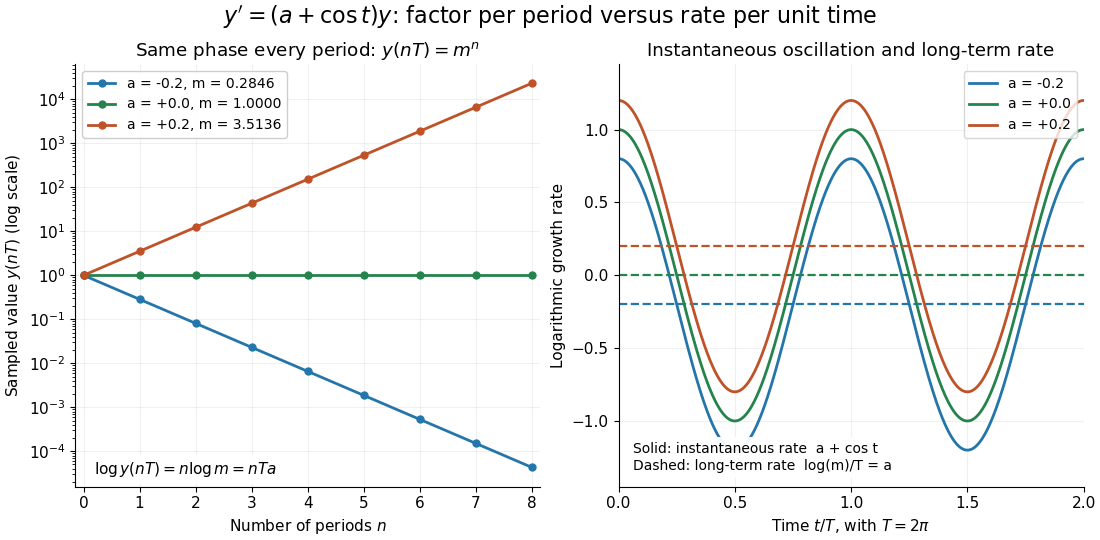
For the general finite-dimensional homogeneous linear differential equation , assume that is continuous on the real line and -periodic, with . Normalize its fundamental matrix by and set . The maximal asymptotic exponential rate, using any induced matrix norm, isHere is the spectral radius, are the Floquet multipliers, and invertibility gives . This concerns growth of the solution operator; it does not say that every initial condition attains the maximum.[ref]
To prove the formula, write with . Periodicity and uniqueness giveBoth and have uniformly bounded matrix norms on a period. Consequently differs from by at most fixed multiplicative factors. The spectral radius formula gives , proving the claimed limit without choosing a matrix logarithm.
For a particular nonzero initial condition , decompose into the generalized eigenspaces of over the complex numbers. The rate of is the largest among components that are nonzero. Generic data have a component in the dominant generalized eigenspaces and attain ; data contained in the sum of the subdominant generalized eigenspaces have a smaller rate. For example, with , the maximal rate is , while decays at rate . These invariant subspaces describe initial data at phase zero. Their transported versions can vary with time and satisfy .
A negative Floquet growth rate allows temporary amplification. For the constant non-normal matrixthe initial condition has Euclidean norm , which rises from to about at before eventually decaying. Its exponential rate is still : the Jordan block contributes a polynomial factor, whose logarithm divided by tends to zero. At a unit-modulus Floquet multiplier, such polynomial growth can even be unbounded with zero exponential rate; gives . Thus zero Floquet growth rate alone proves neither boundedness nor a periodic solution.
For the light quark flavors, electric charge is , with flavor hypercharge . On it gives , and additivity extends it to the baryon octet and meson octet.
Pinned article: Introduction to the OurBigBook Project
Welcome to the OurBigBook Project! Our goal is to create the perfect publishing platform for STEM subjects, and get university-level students to write the best free STEM tutorials ever.
Everyone is welcome to create an account and play with the site: ourbigbook.com/go/register. We belive that students themselves can write amazing tutorials, but teachers are welcome too. You can write about anything you want, it doesn't have to be STEM or even educational. Silly test content is very welcome and you won't be penalized in any way. Just keep it legal!
Intro to OurBigBook
. Source. We have two killer features:
- topics: topics group articles by different users with the same title, e.g. here is the topic for the "Fundamental Theorem of Calculus" ourbigbook.com/go/topic/fundamental-theorem-of-calculusArticles of different users are sorted by upvote within each article page. This feature is a bit like:
- a Wikipedia where each user can have their own version of each article
- a Q&A website like Stack Overflow, where multiple people can give their views on a given topic, and the best ones are sorted by upvote. Except you don't need to wait for someone to ask first, and any topic goes, no matter how narrow or broad
This feature makes it possible for readers to find better explanations of any topic created by other writers. And it allows writers to create an explanation in a place that readers might actually find it.
Figure 1. Screenshot of the "Derivative" topic page. View it live at: ourbigbook.com/go/topic/derivativeVideo 2. OurBigBook Web topics demo. Source. - local editing: you can store all your personal knowledge base content locally in a plaintext markup format that can be edited locally and published either:This way you can be sure that even if OurBigBook.com were to go down one day (which we have no plans to do as it is quite cheap to host!), your content will still be perfectly readable as a static site.
- to OurBigBook.com to get awesome multi-user features like topics and likes
- as HTML files to a static website, which you can host yourself for free on many external providers like GitHub Pages, and remain in full control

Figure 2. You can publish local OurBigBook lightweight markup files to either OurBigBook.com or as a static website.
Figure 3. Visual Studio Code extension installation.
Figure 5. . You can also edit articles on the Web editor without installing anything locally. Video 3. Edit locally and publish demo. Source. This shows editing OurBigBook Markup and publishing it using the Visual Studio Code extension. 
- Infinitely deep tables of contents:



All our software is open source and hosted at: github.com/ourbigbook/ourbigbook
Further documentation can be found at: docs.ourbigbook.com
Feel free to reach our to us for any help or suggestions: docs.ourbigbook.com/#contact