Topics (349k) Articles (361k) Users (410) Discussions (238) Comments (383) Files (12k) New article

Transport and eruption or intrusion of molten rock and associated gases. Subduction, spreading and mantle upwellings can supply melt; volcanism does not require globally active plate tectonics. Outgassing couples interior evolution to atmospheric inventories.
A long-term carbon cycle coupling silicate weathering, carbonate formation and interior recycling with volcanic carbon dioxide supply. Its temperature- and water-dependent weathering can provide a climate feedback. Active plate tectonics can support recycling, but the effectiveness of the feedback also depends on rock exposure, water and reaction rates.
An ice giant with substantial heavy material beneath its H/He envelope. Its low intrinsic luminosity makes efficient, fully mixed cooling an imperfect universal assumption.
For an integer matrix , its th determinantal divisor is the nonnegative greatest common divisor of all -by- matrix minors, with . If all these minors vanish, take . Unimodular row and column operations preserve these divisors. For nonzero invariant factors in the Smith normal form, for , so .
A damped pendulum is a simple pendulum whose mechanical energy is removed by a resisting torque. Here the model is undriven, with a fixed pivot, a point mass at distance , uniform gravitational acceleration , and resisting torque with constant . The angle is measured from the downward vertical in radians. An ideal viscous rotary dashpot realizes this torque law; tangential linear drag on the bob gives the same equation with . The moment of inertia is , soHere is physical time, is the undamped small-amplitude angular frequency, and has units of inverse time. In the normalized equation , dots mean differentiation with respect to , not . The parameter is dimensionless. This separates the chosen damping law from the small-angle approximation: retaining allows finite angles even when the resisting torque is linear in angular velocity.
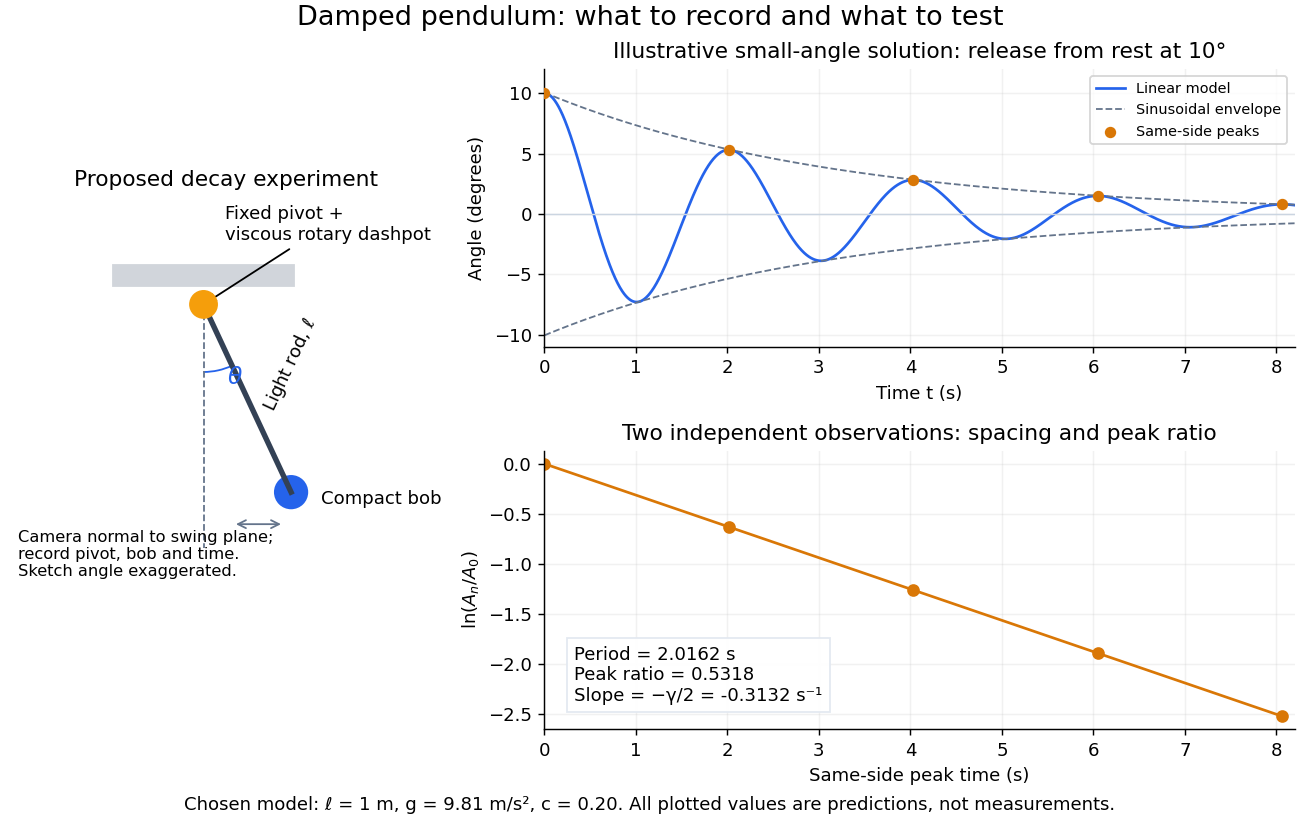
Proposed viscous-damper experiment and illustrative small-angle decay: angle versus time and successive peak ratios, not measured data
. Details. To motivate the model, release a pendulum without a push and record how its swing shrinks. A published example by Gintautas and Hubler uses a rotary sensor built from a computer mouse to measure the frequency and damping coefficient of a physical pendulum. [ref]
https://arxiv.org/abs/0901.4319. Gintautas and Hubler, A simple, low-cost, data-logging pendulum built from a computer mouse, 2009
The following is a proposed experiment with a chosen viscous rotary dashpot; the plotted observations are predictions, not a reproduction of their measurements.Mount a compact bob on a light rigid rod with a fixed pivot, couple the pivot to an adjustable viscous rotary dashpot, and measure from the pivot to the bob's centre. First record decay with the dashpot disconnected, then repeat with it connected at several settings; this establishes how much decay is already due to other losses. Keep the bob, rod, camera, and release angle unchanged between these trials. The simple model requires rod and damper-rotor moments of inertia to be negligible compared with . Otherwise measure the total moment of inertia and the distance to the assembly's centre of mass: the physical pendulum equation becomes , where is the total moving mass. A damper that also exerts an elastic restoring torque would require another term.
Place a camera perpendicular to the swing plane, include the pivot and bob centre in every frame, and determine their coordinates relative to the resting vertical. For horizontal and downward separations , use ; record the frame timestamps rather than assuming a frame rate. Release from rest at about , record through several complete swings, and repeat the release. For every same-side turning point, tabulate its time and angular amplitude . Measure the oscillation period from differences ; comparing several periods exposes drift. Interpolating around each observed extremum reduces frame discretization error. Check that late peaks still exceed the angular resolution; taking the natural logarithm of tiny, uncertain peaks amplifies their relative errors.
In the small-angle approximation, the damped pendulum becomes a damped harmonic oscillator. For and release from rest at , its exact linear-model solution isThe decaying sinusoidal envelope has coefficient ; because release is from rest, its successive same-side extrema occur at and have . Thus the envelope and the sequence of actual peak heights are different descriptions of the same trace. The linear damping regimes and this solution are derived in Richard Fitzpatrick, Damped Oscillatory Motion, equations 82–93.
The experiment tests two predictions independently: nearly equal same-side peak spacing and a straight line when plotting against . Its predicted slope is , givingUse several peaks and repeated trials rather than a single ratio, and compare the frequency identity with independently measured and . For the illustrative choices , , , and , the linear model gives , , and . The first two positive peaks after release are therefore approximately and . The undamped small-amplitude oscillation period is about : substantial loss per swing need not imply a large change in period.
Repeat at a larger release angle to distinguish two limitations. The relative error in replacing by is about for small angles: about at , but about at when compared with . Finite-amplitude swing spacing can therefore change as the swing shrinks even if is constant. Separately, friction at the pivot or quadratic drag can invalidate the assumed linear resisting torque; exponential peak decay should be checked, not imposed on all recorded motion. Peters discusses why real pendulum damping can require nonlinear terms. [ref]
https://arxiv.org/abs/physics/0306081. Randall D. Peters, Nonlinear Damping of the 'Linear' Pendulum, 2003
Repeatability, residual pivot motion, changes in damper temperature, and finite camera resolution are useful checks on this proposed measurement.The normalized equilibrium points are . Even multiples of are attracting: their linearization has eigenvalues , giving a stable focus for , repeated negative eigenvalues at , and a stable node for . These are the underdamped, critically damped, and overdamped small-displacement regimes. Odd multiples of have eigenvalues of opposite signs and are saddle equilibria. The energy dissipation of a damped pendulum explains why trajectories in the phase portrait spiral inward near a stable focus instead of closing into the recurring orbit of an undamped simple pendulum.
After continued-fraction recovery in quantum order finding, an even candidate denominator can be used to try the displayed greatest common divisors. Return only a divisor strictly between one and . If is the true even multiplicative order with a nontrivial halfway power, success follows from factor extraction from an even modular order. A candidate that is not a period can occasionally still yield a factor; testing before the gcds therefore changes single-run success probabilities. The output-factor check guarantees correctness in either convention.
A partition in which every vertical section of and every horizontal section of is countable. Swapping the coordinate directions gives the equivalent convention.
For functions , write when for all sufficiently large . A dominating family is cofinal for this relation.
The notation says that every -coloring of the -element subsets of has a homogeneous subset of order type . At infinite arity one specifies whether the domain subsets have a fixed cardinality or a fixed order type; the usual finite-arity notation has no such ambiguity.
For a set of size an uncountable regular cardinal , an increasing sequence with union , each , and at every nonzero limit stage.
Specify distributions of measurements separately by observation pattern and vary assumptions about unseen values that the observed data do not identify. For example, shift the imputed binary-response log odds for nonresponders away from its missing at random prediction and refit the substantive analysis. This investigates missing not at random departures rather than testing them from observed data.
Single-valued semiclassical phase on a closed classical orbit quantizes its action, with Maslov index accounting for turning-point phase corrections. A cyclic angle has no oscillator turning points: its wavefunctions are , with signed for a period and canonical momentum . There is no half-integer shift for that free angular coordinate.
Sediment resuspension transfers deposited bed particles into a particle suspension. It can supply particle buoyancy flux to a particle-laden gravity current if erosion or upward mixing exceeds settling losses. Ambient fluid without particles dilutes concentration without supplying particle mass.
In units , a Schwarzschild black hole has Hawking temperature , so its heat capacity is . It heats up as it loses mass, preventing stable canonical equilibrium with an unlimited thermal reservoir.
The Kruskal spacetime is the maximal analytic extension of the positive-mass vacuum Schwarzschild spacetime. It contains two exterior regions, a black hole, and a white hole. Kruskal–Szekeres coordinates remove both horizon coordinate singularities, while remains a curvature singularity.
Schwarzschild time is the exterior time coordinate normalized to the proper time of static observers at infinity. At fixed exterior radius, . A received signal and its emission occur at different values of this coordinate.
Pinned article: Introduction to the OurBigBook Project
Welcome to the OurBigBook Project! Our goal is to create the perfect publishing platform for STEM subjects, and get university-level students to write the best free STEM tutorials ever.
Everyone is welcome to create an account and play with the site: ourbigbook.com/go/register. We belive that students themselves can write amazing tutorials, but teachers are welcome too. You can write about anything you want, it doesn't have to be STEM or even educational. Silly test content is very welcome and you won't be penalized in any way. Just keep it legal!
Intro to OurBigBook
. Source. We have two killer features:
- topics: topics group articles by different users with the same title, e.g. here is the topic for the "Fundamental Theorem of Calculus" ourbigbook.com/go/topic/fundamental-theorem-of-calculusArticles of different users are sorted by upvote within each article page. This feature is a bit like:
- a Wikipedia where each user can have their own version of each article
- a Q&A website like Stack Overflow, where multiple people can give their views on a given topic, and the best ones are sorted by upvote. Except you don't need to wait for someone to ask first, and any topic goes, no matter how narrow or broad
This feature makes it possible for readers to find better explanations of any topic created by other writers. And it allows writers to create an explanation in a place that readers might actually find it.
Figure 1. Screenshot of the "Derivative" topic page. View it live at: ourbigbook.com/go/topic/derivativeVideo 2. OurBigBook Web topics demo. Source. - local editing: you can store all your personal knowledge base content locally in a plaintext markup format that can be edited locally and published either:This way you can be sure that even if OurBigBook.com were to go down one day (which we have no plans to do as it is quite cheap to host!), your content will still be perfectly readable as a static site.
- to OurBigBook.com to get awesome multi-user features like topics and likes
- as HTML files to a static website, which you can host yourself for free on many external providers like GitHub Pages, and remain in full control

Figure 2. You can publish local OurBigBook lightweight markup files to either OurBigBook.com or as a static website.
Figure 3. Visual Studio Code extension installation.
Figure 5. . You can also edit articles on the Web editor without installing anything locally. Video 3. Edit locally and publish demo. Source. This shows editing OurBigBook Markup and publishing it using the Visual Studio Code extension. 
- Infinitely deep tables of contents:



All our software is open source and hosted at: github.com/ourbigbook/ourbigbook
Further documentation can be found at: docs.ourbigbook.com
Feel free to reach our to us for any help or suggestions: docs.ourbigbook.com/#contact