
E.g. in , the underlying field is , the real numbers. And in the underlying field is , the complex numbers.
Any field can be used, including finite field. But the underlying thing has to be a field, because the definitions of a vector need all field properties to hold to make sense.
Note that odd permutations don't form a subgroup of the symmetric group like the even permutations do, because the composition of two odd permutations is an even permutation.
en.wikipedia.org/w/index.php?title=Mathieu_group&oldid=1034060469#Multiply_transitive_groups is a nice characterization of 4 of the Mathieu groups.
Not unique: different generating sets lead to different graphs, see e.g. two possible en.wikipedia.org/w/index.php?title=Cayley_graph&oldid=1028775401#Examples for the
Ultimate explanation: math.stackexchange.com/questions/776039/intuition-behind-normal-subgroups/3732426#3732426
Only normal subgroups can be used to form quotient groups: their key definition is that they plus their cosets form a group.
One key intuition is that "a normal subgroup is the kernel" of a group homomorphism, and the normal subgroup plus cosets are isomorphic to the image of the isomorphism, which is what the fundamental theorem on homomorphisms says.
Therefore "there aren't that many group homomorphism", and a normal subgroup it is a concrete and natural way to uniquely represent that homomorphism.
The best way to think about the, is to always think first: what is the homomorphism? And then work out everything else from there.
A measurable function defined on a closed interval is square integrable (and therefore in ) if and only if Fourier series converges in norm the function:
This is the standard model.
Ciro Santilli's preferred visualization of the real projective plane is a small variant of the standard "lines through origin in ".
For those sphere points in the circle on the x-y plane, you should think of them as magic poins that are identified with the corresponding antipodal point, also on the x-y, but on the other side of the origin. So basically you you can teleport from one of those to the other side, and you are still in the same point.
Ciro likes this model because then all the magic is confined just to the part of the model, and everything else looks exactly like the sphere.
It is useful to contrast this with the sphere itself. In the sphere, all points in the circle are the same point. But this is not the case for the projective plane. You cannot instantly go to any other point on the by just moving a little bit, you have to walk around that circle.
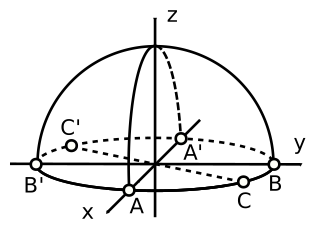
Spherical cap model of the real projective plane
. On the x-y plane, you can magically travel immediately between antipodal points such as A/A', B/B' and C/C'. Or equivalently, those pairs are the same point. Every other point outside the x-y plane is just a regular point like a normal sphere.www.youtube.com/watch?v=tq7sb3toTww&list=PLxBAVPVHJPcrNrcEBKbqC_ykiVqfxZgNl&index=19 mentions that it is a bit like a dot product but for a tangent vector to a manifold: it measures how much that vector derives along a given direction.
In plain English: the space has no visible holes. If you start walking less and less on each step, you always converge to something that also falls in the space.
One notable example where completeness matters: Lebesgue integral of is complete but Riemann isn't.
When a disconnected space is made up of several smaller connected spaces, then each smaller component is called a "connected component" of the larger space.
See for example the
Pinned article: Introduction to the OurBigBook Project
Welcome to the OurBigBook Project! Our goal is to create the perfect publishing platform for STEM subjects, and get university-level students to write the best free STEM tutorials ever.
Everyone is welcome to create an account and play with the site: ourbigbook.com/go/register. We belive that students themselves can write amazing tutorials, but teachers are welcome too. You can write about anything you want, it doesn't have to be STEM or even educational. Silly test content is very welcome and you won't be penalized in any way. Just keep it legal!
Intro to OurBigBook
. Source. We have two killer features:
- topics: topics group articles by different users with the same title, e.g. here is the topic for the "Fundamental Theorem of Calculus" ourbigbook.com/go/topic/fundamental-theorem-of-calculusArticles of different users are sorted by upvote within each article page. This feature is a bit like:
- a Wikipedia where each user can have their own version of each article
- a Q&A website like Stack Overflow, where multiple people can give their views on a given topic, and the best ones are sorted by upvote. Except you don't need to wait for someone to ask first, and any topic goes, no matter how narrow or broad
This feature makes it possible for readers to find better explanations of any topic created by other writers. And it allows writers to create an explanation in a place that readers might actually find it.
Figure 1. Screenshot of the "Derivative" topic page. View it live at: ourbigbook.com/go/topic/derivativeVideo 2. OurBigBook Web topics demo. Source. - local editing: you can store all your personal knowledge base content locally in a plaintext markup format that can be edited locally and published either:This way you can be sure that even if OurBigBook.com were to go down one day (which we have no plans to do as it is quite cheap to host!), your content will still be perfectly readable as a static site.
- to OurBigBook.com to get awesome multi-user features like topics and likes
- as HTML files to a static website, which you can host yourself for free on many external providers like GitHub Pages, and remain in full control

Figure 3. Visual Studio Code extension installation.
Figure 4. Visual Studio Code extension tree navigation.
Figure 5. Web editor. You can also edit articles on the Web editor without installing anything locally.Video 3. Edit locally and publish demo. Source. This shows editing OurBigBook Markup and publishing it using the Visual Studio Code extension.Video 4. OurBigBook Visual Studio Code extension editing and navigation demo. Source. 
- Infinitely deep tables of contents:


All our software is open source and hosted at: github.com/ourbigbook/ourbigbook
Further documentation can be found at: docs.ourbigbook.com
Feel free to reach our to us for any help or suggestions: docs.ourbigbook.com/#contact