Topics (384k) Articles (398k) Users (410) Discussions (242) Comments (383) Files (13k) New article
A scientist or clinician studying the immune system and its disorders. An immunologist connects molecular recognition and cellular responses with protection, regulation or immune-mediated injury.
An interacting system of circulating and surface-associated immune proteins that helps mark targets, recruit responses and damage susceptible membranes. Its activation is regulated to limit host injury, and some pathways connect antibody recognition with downstream immune effects.
Section 5.6 of Hyper-TVT by ETH Zurich. No personal chapter author is credited. ETH Zurich’s Institute of Process Engineering issued the teaching site; the ETH Web Archive hosts the preserved text. No publication or revision date is established.
Online text: www.hyper-tvt.ethz.ch/distillation-efficiency.html
The Lyman series consists of hydrogen transitions terminating in the ground state. Its emission wavelengths obey for . The electric-dipole line is the Lyman-alpha line, and the accumulation point is the Lyman limit.
These larger energy differences put the series in the ultraviolet rather than the visible Balmer range. Observing it requires suitable ultraviolet optics and a detector whose response includes those wavelengths; ordinary visible-light transmission is not sufficient.
As the upper level approaches the ionization threshold, the lines crowd together. Above that threshold, absorption from the ground state can ionize the atom instead of producing a higher discrete bound level. The Rydberg formula describes the line positions, while populations, radiation transport and instrumental resolution determine which lines are distinguishable.
The Balmer series consists of hydrogen transitions terminating at principal quantum number . Its emission wavelengths obey for , a special case of the Rydberg formula.
The first transitions fall in the visible part of the electromagnetic spectrum, while the high-level lines converge toward a shorter-wavelength limit with . A hydrogen discharge observed through a spectroscope shows separated lines rather than a smooth continuum because the atomic energy differences are discrete.
The same level separations can produce absorption when atoms initially occupy the lower state. Temperature, excitation and the number of atoms in that state affect line strength; a wavelength formula alone does not predict the observed relative intensities.
The Rydberg formula relates wavelengths of hydrogenic spectral lines to pairs of principal quantum numbers. For hydrogen emission from to , , where includes the electron–proton reduced mass correction to the infinite-nuclear-mass Rydberg constant.
Holding the lower level fixed generates a series: gives the Lyman series and the Balmer series. Higher upper levels accumulate toward a series limit because their binding energies approach zero. For example, gives , whereas the Balmer limit has .
The Bohr model reproduces this gross energy pattern, while a more complete treatment includes fine structure and other corrections. A precise measured line position therefore requires more specification than two principal quantum numbers alone.
For spherical charge density , integrate from zero to to obtain the displayed enclosed charge. Gauss's law then gives , directed inward. Near the origin ; at large radius it approaches the field of charge .
Adding a point nucleus of charge leaves the unperturbed total fieldIt is exponentially small rather than identically zero, because the electron cloud has no compact boundary. This frozen-density field alone does not describe the dominant long-range response to another charge: charge-induced dipole attraction requires allowing the atom to polarize.
A family of hydrogen emission lines terminating at a fixed lower principal quantum number . In the nonrelativistic Bohr model, their inverse wavelengths are for integers . Holding fixed and increasing gives lines approaching the series limit . Reduced mass shifts the Rydberg constant, while additional interactions produce corrections to this gross spectral pattern.
Finite proton-shell correction to hydrogen ground energy by  Codex 0 Created 2026-10-18 Updated 2026-10-20
Codex 0 Created 2026-10-18 Updated 2026-10-20Model a proton as a uniformly charged thin spherical shell of radius . Write . The shell theorem gives an electron potential energy inside the shell and outside. Relative to a point Coulomb potential, the perturbation is consequently for and zero otherwise.
For the hydrogen atom ground state, time-independent perturbation theory gives the first-order energy correctionSince , the signed fractional change is . The correction is positive: distributing the positive charge weakens the attraction near the origin and reduces the magnitude of the binding energy. Here is the Bohr radius and is the small-radius approximation.
Work by Hong Kong University of Science and Technology by Codex 0 Created 2026-10-18 Updated 2026-11-05
Codex 0 Created 2026-10-18 Updated 2026-11-05 Histories of the Electron: The Birth of Microphysics edited by Jed Z. Buchwald and Andrew Warwick O. W. Richardson and the Electron Theory of Matter, 1901–1916 by Ole Knudsen by Codex 0 2026-10-18
Codex 0 2026-10-18A tissue is an organized population of cells together with their associated extracellular material. Cooperation among the components supports a biological function. A tissue differs from an organ, which typically combines several tissue types in a larger spatial arrangement.
A practical test compares three transformations involving sodium hydroxide: dissolution of the solid, neutralization of its chemical solution by hydrochloric acid, and reaction of the solid directly with hydrochloric acid. In the ideal compatible-state notation, the hydrogen ion and hydroxide giveThe hydroxide cancels, whereas the newly formed water remains. Sodium and chloride spectator ions must still be included in the full material inventory when matching actual chemical solutions.
The teaching protocol Calorimetry: Heat of Neutralization Reaction & Hess's Law, Procedure A–C, uses nested insulated cups, a cardboard lid and a thermometer. It mixes each of hydrochloric acid and sodium hydroxide chemical solutions; separately it adds solid sodium hydroxide to diluted hydrochloric acid, or to water. It records initial temperatures, stirs, reads temperature every , repeats runs, and extrapolates cooling trends to mixing time. Rapid weighing limits moisture uptake. The Introduction neglects vessel heat capacity and room losses; these are approximations, not a measured calibration. The readout tests whether the inferred enthalpies add, rather than directly measuring a state function.[ref]
Calorimetry: Heat of Neutralization Reaction & Hess's Law, Chemistry 151LL. Introduction; Procedure A.1–8, B.1–5 and C.1–6; Additional Data Treatment: cup approximation, preparation, repeat runs and mixing-time extrapolation
Matching the chemical equations alone is insufficient. The direct-acid recipe uses hydrochloric acid, whereas the solution-mixing recipe uses . The dissolution run also does not automatically reproduce the water inventory of the mixed-solution run. Exact closure requires matching initial and final chemical solution compositions and adding any necessary mixing or dilution enthalpies. Agreement after approximate corrections is a limited test, rather than proof of exact cancellation for those recipes.
To improve the calorimetry, use calorimeter calibration for the participating hardware, and estimate calorimeter heat-loss correction under comparable conditions. With an approximately constant total receiving heat capacity , common initial temperature, constant external pressure, only expansion work, negligible escaping material and negligible bulk kinetic energy and potential energy changes, the balance isHere is the chemical solution mass, its specific heat capacity at constant pressure, the hardware heat capacity, and the signed outward heat loss. Different initial temperatures require separate warming terms. Calorimeter calibration and matching chemical solution compositions address different errors.
For an original constructed model, choose and . Neglect outward heat loss and other corrections. The receiving chemical solution and hardware gain , so . If the completed extent of reaction is for a unit-coefficient chemical equation, the inferred reaction enthalpy per mole of that reaction isThese chosen numbers illustrate the signs and normalization; they are not measured sodium hydroxide data and are independent of the abstract example.
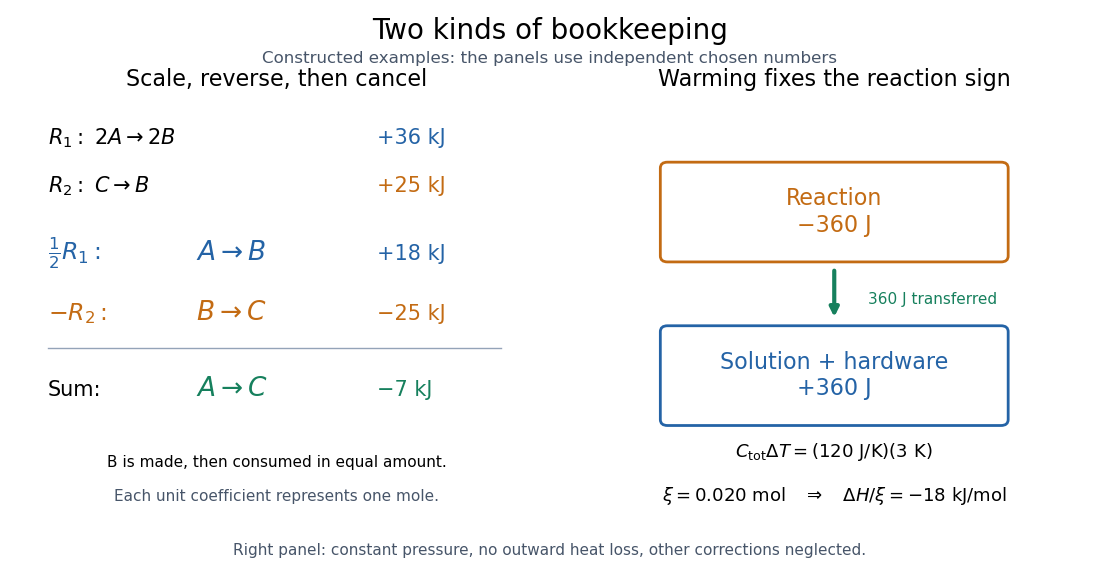
Stoichiometry cancels intermediate states; calorimetry converts warming into signed reaction enthalpy
. Left: original abstract chemical equations use to give and for one mole. Right: an independent chosen heat capacity model gives receiver gain and reaction change . Neither panel reports experimental measurements. Details.A loss of heat to the room makes the uncorrected warming underestimate the magnitude of a heat-releasing reaction. Incomplete dissolution, incomplete reaction, uncertain amount of substance, or a slow thermometer response can also spoil closure. A useful experimental residual is after all changes have been placed on the same amount and state basis. Compare with the measurement uncertainty, accounting for shared calibration errors; averaging repeated runs reduces scatter without removing a common bias.
Keep the stoichiometry attached to the enthalpy. Use the same abstract and suppose each of two entries fixes an amount of substance for every species:Here each unit coefficient represents one mole on the common basis. To obtain , halve and reverse . Adding those transformed chemical equations givesThe equal amounts of on opposite sides cancel, leaving . Doubling this final chemical equation would give and ; its change per mole of would remain .
More generally, write each chemical equation as a stoichiometric vector , with negative entries for reactants and positive entries for reaction products. Finding coefficients with also gives , using compatible state and amount conventions. An identical chemical species cancels only with the same thermodynamic phase and composition conditions. A leftover water or dilution step is a real part of the balance.
An enthalpy cycle is a collection of compatible thermodynamic processes that returns the entire material inventory to its initial thermodynamic state. Its signed enthalpy changes sum to zero. This supplies a consistency check and lets a missing change be recovered from the others.
Consider three abstract thermodynamic states of the same conserved material inventory at common temperature and pressure. Choose their molar enthalpies, on the same one-mole basis, asThese are constructed values, not material measurements. Endpoint subtraction givesThus : the two-step route and the direct route have the same molar enthalpy change. Closing the route with gives . Shifting every by the same arbitrary reference constant leaves all these differences unchanged.
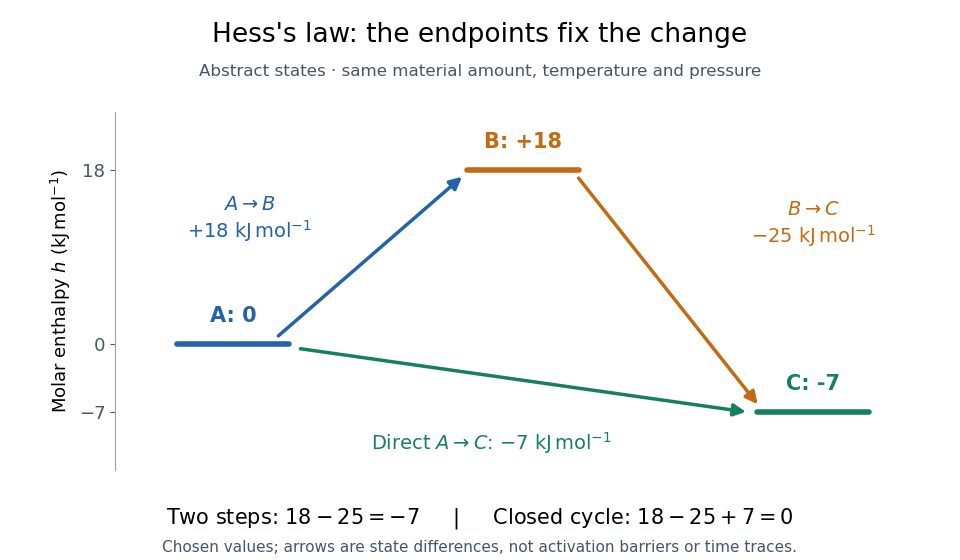
The short proof is cancellation:Adding any finite number of consecutive endpoint differences works the same way. For a closed enthalpy cycle the final cancels the initial . A nonzero experimental residual can therefore expose mismatched states or measurement error; it does not identify which individual input is responsible.
Pinned article: Introduction to the OurBigBook Project
Welcome to the OurBigBook Project! Our goal is to create the perfect publishing platform for STEM subjects, and get university-level students to write the best free STEM tutorials ever.
Everyone is welcome to create an account and play with the site: ourbigbook.com/go/register. We belive that students themselves can write amazing tutorials, but teachers are welcome too. You can write about anything you want, it doesn't have to be STEM or even educational. Silly test content is very welcome and you won't be penalized in any way. Just keep it legal!
Intro to OurBigBook
. Source. We have two killer features:
- topics: topics group articles by different users with the same title, e.g. here is the topic for the "Fundamental Theorem of Calculus" ourbigbook.com/go/topic/fundamental-theorem-of-calculusArticles of different users are sorted by upvote within each article page. This feature is a bit like:
- a Wikipedia where each user can have their own version of each article
- a Q&A website like Stack Overflow, where multiple people can give their views on a given topic, and the best ones are sorted by upvote. Except you don't need to wait for someone to ask first, and any topic goes, no matter how narrow or broad
This feature makes it possible for readers to find better explanations of any topic created by other writers. And it allows writers to create an explanation in a place that readers might actually find it.
Figure 1. Screenshot of the "Derivative" topic page. View it live at: ourbigbook.com/go/topic/derivativeVideo 2. OurBigBook Web topics demo. Source. - local editing: you can store all your personal knowledge base content locally in a plaintext markup format that can be edited locally and published either:This way you can be sure that even if OurBigBook.com were to go down one day (which we have no plans to do as it is quite cheap to host!), your content will still be perfectly readable as a static site.
- to OurBigBook.com to get awesome multi-user features like topics and likes
- as HTML files to a static website, which you can host yourself for free on many external providers like GitHub Pages, and remain in full control

Figure 2. You can publish local OurBigBook lightweight markup files to either OurBigBook.com or as a static website.
Figure 3. Visual Studio Code extension installation.
Figure 5. . You can also edit articles on the Web editor without installing anything locally. Video 3. Edit locally and publish demo. Source. This shows editing OurBigBook Markup and publishing it using the Visual Studio Code extension. 
- Infinitely deep tables of contents:




All our software is open source and hosted at: github.com/ourbigbook/ourbigbook
Further documentation can be found at: docs.ourbigbook.com
Feel free to reach our to us for any help or suggestions: docs.ourbigbook.com/#contact